
The Network Management API is used to send network requests or receive notifications on network events. The API allows applications, as well as network layer code itself, to call defined network routines at any level in the IP stack, or receive notifications on relevant network events. Procedure requests are done through a single net_mgmt() API that invokes the registered handler for the corresponding request.
Enabling the API
To enable the Network Management API in your application, we can enable the following Kconfigs
CONFIG_NET_MGMT=y
CONFIG_NET_MGMT_EVENT=y
CONFIG_NET_MGMT_EVENT_INFO=y
CONFIG_NET_MGMT_EVENT_STACK_SIZE=4096CONFIG_NET_MGMT: Adds the Network Management APICONFIG_NET_MGMT_EVENT: Adds support for runtime network event notificationsCONFIG_NET_MGMT_EVENT_INFO: Adds supports for passing information along with an eventCONFIG_NET_MGMT_EVENT_STACK_SIZE: Increase stack size to be able to handle all events
In addition, you need to include the following header files
#include <zephyr/net/wifi.h>
#include <zephyr/net/wifi_mgmt.h>
#include <zephyr/net/net_mgmt.h>wifi.h: Header file for Wi-Fi Management APIwifi_mgmt.h: Header file for Wi-Fi specific Network Management API’snet_mgmt.h: Header file for the Network Management API
In this course, we will be using the network connection manager, an experimental feature of nRF Connect SDK, to listen to the network interface and IP events to verify whether an interface is connected or not.
The Kconfig CONFIG_NET_CONNECTION_MANAGER will add and start the connection manager in the application, and will raise L4 events “connected” and “disconnected”,
CONFIG_NET_CONNECTION_MANAGER=yEnabling Wi-Fi
To be able to use the Network Management API to connect to Wi-Fi, we also need to enable Wi-Fi in the application.
This is done by enabling the following Kconfigs
CONFIG_WIFI=y
CONFIG_WIFI_NRF700X=y
CONFIG_WPA_SUPP=yCONFIG_WIFI: Enables the general Wi-Fi driversCONFIG_WIFI_NRF700X: Enables the Nordic Wi-Fi DriverCONFIG_WPA_SUPP: Enables WPA (Wi-Fi Protected Access) supplicant support, primarily responsible for implementing the authentication phase of WPA, as well as network scanning, key exchange and roaming support.
Configure the Wi-Fi parameters
When connecting to Wi-Fi, the parameters are passed in the structure struct wifi_connect_req_params, which has the following signature


- SSID – SSID of your Wi-Fi network
- PSK – PSK, typically a passphrase or password
- SAE password (sae_password) – SAE password, if using WPA3
- Band (band) – Wi-Fi band you want to connect to
- Channel (channel) – Wi-Fi channel to use
- Security – The security type to use (NONE, PSK, PSK_SHA256, SAW, WAPI, EAP, WEP, WPA_SPK)
- MFP – Management frame protection options
- Timeout – Connection timeout in seconds
Here is an example of populating the Wi-Fi parameters
static struct wifi_connect_req_params params = {
    .ssid = CONFIG_SSID;
    .ssid_length = strlen(params->ssid);
    .psk = CONFIG_PASSWORD;
    .psk_length = strlen(params->psk);
    .channel = WIFI_CHANNEL_ANY;
    .security = WIFI_SECURITY_TYPE_PSK;
    .mfp = WIFI_MFP_OPTIONAL;
    .timeout = SYS_FOREVER_MS;
}Request the Wi-Fi connection
All network management requests are called using net_mgmt(), which has the following signature

mgmt_request: a bitmask to indicate which stack layer is targeted, if anet_ifobject is implied and the specific management procedure being requestediface: network interface being used, use the helper functionnet_if_get_first_wifi()(gets the first Wi-Fi network interface) ornet_if_get_default()(gets the default network interface).data: the Wi-Fi configuration parameters, stored instruct wifi_connect_req_paramslen: the length ofdata, i.esizeof(struct wifi_connect_req_params)
To request the Wi-Fi connection, we will use the command NET_REQUEST_WIFI_CONNECT, as shown below
struct net_if *iface = net_if_get_first_wifi();
int err = net_mgmt(NET_REQUEST_WIFI_CONNECT, iface, ¶ms, sizeof(struct wifi_connect_req_params));
if (err) {
LOG_ERR("Connecting to Wi-Fi failed, err: %d", err);
return ENOEXEC;
}Listen to network events
After we have requested a Wi-Fi connection, we want to register a callback function to listen to network events so the application is notified when the Wi-Fi connection has been established.
The callback handler function net_mgmt_event_handler_t must have the following signature
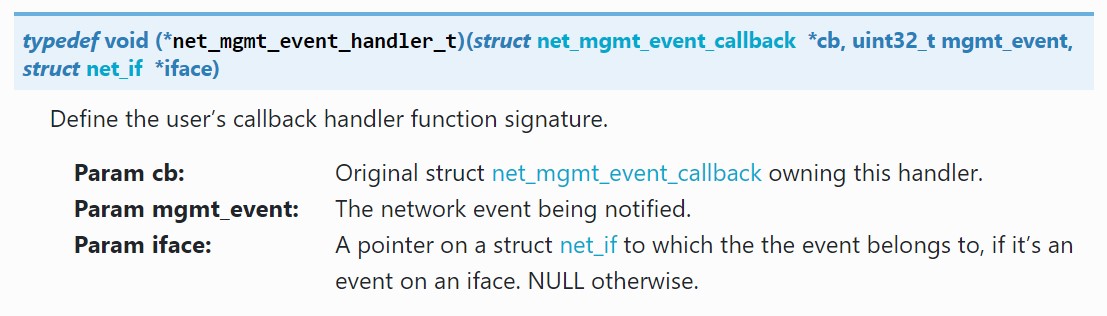
The Wi-Fi-related network events are defined in the Wi-Fi Management API, such as NET_EVENT_WIFI_CONNECT_RESULT and NET_EVENT_WIFI_DISCONNECT_RESULT.
However, we will instead be using the events defined in the network connection manager: NET_EVENT_L4_CONNECTED and NET_EVENT_L4_DISCONNECTED. The network connection manager adds a layer of abstraction to your application to easily be able to port an application between different connection protocols, for example, Wi-Fi and cellular.
It is important to note that the NET_EVENT_L4_CONNECTED event is only triggered once your device has received an IP address, so CONFIG_DHCPV4 must be enabled in the application.
Define the callback function
Define the callback function net_mgmt_event_handler()
static void net_mgmt_event_handler(struct net_mgmt_event_callback *cb,
			  uint32_t mgmt_event, struct net_if *iface)
{
	if ((mgmt_event & EVENT_MASK) != mgmt_event) {
		return;
	}
	if (mgmt_event == NET_EVENT_L4_CONNECTED) {
		LOG_INF("Network connected");
		k_sem_give(&run_app);
		return;
	}
	if (mgmt_event == NET_EVENT_L4_DISCONNECTED) {
		if (connected == false) {
			LOG_INF("Waiting for network to be connected");
		} else {
			LOG_INF("Network disconnected");
			connected = false;
		}
		k_sem_reset(&run_app);
		return;
	}
}Initialize and add the callback structure
First, define the Network Management event callback structure, struct net_mgmt_event_callback.
static struct net_mgmt_event_callback mgmt_cb;To initialize the callback structure, we will use the helper function net_mgmt_init_event_callback() which has the following signature

Then, we need to add the callback structure using net_mgmt_add_event_callback() which has the following signature

net_mgmt_init_event_callback(&mgmt_cb, net_mgmt_event_handler, EVENT_MASK);
net_mgmt_add_event_callback(&mgmt_cb);Automatic connection feature
The Wi-Fi management extension library adds an automatic connect feature to the Wi-Fi stack, by using the NET_REQUEST_WIFI_CONNECT_STORED command in net_mgmt().
Add the library to your application through the following Kconfig
CONFIG_WIFI_MGMT_EXT=yInclude the header file for the library in the main.c file of your application
#include <net/wifi_mgmt_ext.h>struct net_if *iface = net_if_get_first_wifi();
int err = net_mgmt(NET_REQUEST_WIFI_CONNECT_STORED, iface, NULL, 0);
if (err) {
LOG_ERR("Auto-connecting to Wi-Fi failed, err: %d", err);
return ENOEXEC;
}Important
Please note that although this is the most configurable way to request a Wi-Fi connection, since you can configure struct wifi_connect_req_params, it requires inputting Wi-Fi credentials into the application firmware and is therefore not secure and not recommended in production, but rather for development purposes. We will take a look at a more secure way to provision the network credentials in Exercise 2 of this lesson.
