
The Network Management API is used to send network requests or receive notifications on network events. at any level in the IP stack. The API allows applications, as well as network layer code itself, to call defined network routines at any level in the IP stack, or receive notifications on relevant network events. Defined procedure handlers are registered by using a NET_MGMT_REGISTER_REQUEST_HANDLER macro, and procedure requests are done through a single net_mgmt() API that invokes the registered handler for the corresponding request.
Enabling the API
To enable the Network Management API in your application, we can enable the following Kconfigs
CONFIG_NET_MGMT=y
CONFIG_NET_MGMT_EVENT=y
CONFIG_NET_MGMT_EVENT_INFO=yCONFIG_NET_MGMT: Adds the Network Management APICONFIG_NET_MGMT_EVENT: Adds support for runtime network event notificationsCONFIG_NET_MGMT_EVENT_INFO: Adds supports for passing information along with an event
In addition, you need to include the header file for the API
#include <zephyr/net/net_mgmt.h>Wi-Fi management API
The Wi-Fi management API is used to manage Wi-Fi networks and is implemented in the wifi_mgmt module as part of the network L2 stack (zephyr/subsys/net/l2).
It contains the Wi-Fi relevant procedure requests for the Network Management API, such as NET_REQUEST_WIFI_CONNECT to connect to Wi-FI.
It is automatically included when enabling Wi-Fi (specifically the Wi-Fi supplicant CONFIG_WIFI_NM_WPA_SUPPLICANT selects CONFIG_NET_L2_WIFI_MGMT), so we only have to include the header file for the API
#include <zephyr/net/wifi_mgmt.h>Connection Manager
In this course, we will be using the Connection Manager, a feature of nRF Connect SDK, to listen to the network interface and IP events to verify whether the network interface is ready. The Connection Manager allows applications to control the connectivity without consideration for the underlying network technologies, making it easy to switch between for example Wi-Fi and cellular connectivity.
The Kconfig CONFIG_NET_CONNECTION_MANAGER will add and start the connection manager in the application, and will raise the L4 events “connected” and “disconnected”.
CONFIG_NET_CONNECTION_MANAGER=yThen we must tell the Connection Manager which L2 connectivity we are using by enabling CONFIG_L2_WIFI_CONNECTIVITY.
CONFIG_L2_WIFI_CONNECTIVITY=yThis will automatically select the following Kconfigs
CONFIG_L2_WIFI_CONNECTIVITY_AUTO_CONNECT– When enabled, connect will automatically be called after the network interface has been brought up.CONFIG_L2_WIFI_CONNECTIVITY_AUTO_DOWN– When enabled, the Wi-Fi interface is automatically taken down when connectivity fails or times out.
To ensure there’s sufficient stack space for the Connection Manager monitor thread to handle the new events, we must increase the stack size, by setting the following Kconfig.
CONFIG_NET_CONNECTION_MANAGER_MONITOR_STACK_SIZE=5200Enabling Wi-Fi
To enable Wi-Fi support for the nRF70 Series devices, we must first enable it in Sysbuild.
Recall
Recall from the nRF Connect SDK Fundamentals course that Sysbuild (System build) is a higher-level build system that can combine multiple other build systems, and is used to configure, build and flash multiple images as part of a single project.
This is done with SB_CONFIG_WIFI_NRF=y by adding the following line to the sysbuild.conf file.
SB_CONFIG_WIFI_NRF70=yNow that we’ve enabled Wi-Fi in our application at the Sysbuild level, we also want to configure the Wi-Fi stack at the application level, through the prj.conf file.
This is done by enabling the following Kconfigs
CONFIG_WIFI=y
CONFIG_WIFI_NM_WPA_SUPPLICANT=yCONFIG_WIFI: Enables the general Wi-Fi drivers in the applicationCONFIG_WIFI_NM_WPA_SUPPLICANT: Enables WPA (Wi-Fi Protected Access) supplicant as the network management backend forWIFI_NM. The WPA supplicant is primarily responsible for implementing the authentication phase of WPA, as well as network scanning, key exchange and roaming support.
Configuring the Wi-Fi stack
The optimize the performance and memory usage of the Wi-Fi stack, there are many configuration options to tweak.
Wi-Fi stack configuration and performance provides a full list of the configuration options and description
We won’t go into all of them, but there are specifically two parameters in the nRF Wi-Fi driver that we will adjust
CONFIG_NRF70_RX_NUM_BUFS [1 – unlimited*] specifies the number of RX buffers that can be used by the nRF Wi-Fi driver. The number of buffers must be enough to keep up with the RX traffic, otherwise packets might be dropped. We will set this to 16, which can handle moderate traffic without excessive memory usage. Reducing this will impact the memory of the application.
CONFIG_NRF70_MAX_TX_AGGREGATION [1 – unlimited*] specifies the maximum number of frames that can be coalesced into a single Wi-Fi frame. More frames imply more coalescing opportunities but can add latency to the TX path as we wait for more frames to arrive. We will set this to 4 which provides moderature frame aggregation without excessive latency. Reducing this will impact the memory of the application and tune the performance.
*based on available memory in the nRF70 Series device
CONFIG_NRF70_RX_NUM_BUFS=16
CONFIG_NRF70_MAX_TX_AGGREGATION=4CONFIG_NRF70_RX_NUM_BUFS: Number of RX buffers, default value 48
CONFIG_NRF70_MAX_TX_AGGREGATION: Maximum number of TX packets to aggregate, default value 12
Configure the Wi-Fi parameters
When connecting to Wi-Fi, the parameters are passed in the structure struct wifi_connect_req_params. Below we see some of the relevant members of this structure


- SSID – SSID of your Wi-Fi network
- PSK – PSK, typically a passphrase or password
- SAE password (sae_password) – SAE password, if using WPA3
- Band (band) – Wi-Fi band you want to connect to
- Channel (channel) – Wi-Fi channel to use
- Security – The security type to use (NONE, PSK, PSK_SHA256, SAW, WAPI, EAP, WEP, WPA_SPK)
- MFP – Management frame protection options
- Timeout – Connection timeout in seconds
Here is an example of populating the Wi-Fi parameters
static struct wifi_connect_req_params cnx_params= {
    .ssid = CONFIG_SSID;
    .ssid_length = strlen(cnx_params->ssid);
    .psk = CONFIG_PASSWORD;
    .psk_length = strlen(cnx_params->psk);
    .channel = WIFI_CHANNEL_ANY;
    .security = WIFI_SECURITY_TYPE_PSK;
    .mfp = WIFI_MFP_OPTIONAL;
    .timeout = SYS_FOREVER_MS;
}Request the Wi-Fi connection
All network management requests are called using net_mgmt(), which has the following signature

mgmt_request: a bitmask to indicate which stack layer is targeted, if anet_ifobject is implied and the specific management procedure being requestediface: network interface being used, use the helper functionnet_if_get_first_wifi()(gets the first Wi-Fi network interface) ornet_if_get_default()(gets the default network interface).data: the Wi-Fi configuration parameters, stored instruct wifi_connect_req_paramslen: the length ofdata, i.esizeof(struct wifi_connect_req_params)
To request the Wi-Fi connection, we will invoke the procedure request with NET_REQUEST_WIFI_CONNECT from the Wi-Fi management API, as shown below
struct net_if *iface = net_if_get_first_wifi();
int err = net_mgmt(NET_REQUEST_WIFI_CONNECT, iface, &cnx_params, sizeof(struct wifi_connect_req_params));
if (err) {
	LOG_ERR("Connecting to Wi-Fi failed, err: %d", err);
	return ENOEXEC;
}Listen to network events
After we have requested a Wi-Fi connection, we want to register a callback function to listen to network events so the application is notified when the Wi-Fi connection has been established.
The callback handler function net_mgmt_event_handler_t must have the following signature
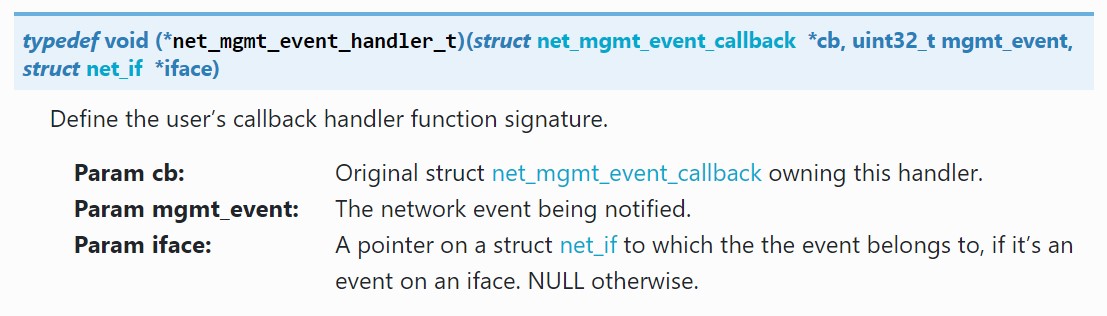
The Wi-Fi-related network events are defined in the Wi-Fi Management API, such as NET_EVENT_WIFI_CONNECT_RESULT and NET_EVENT_WIFI_DISCONNECT_RESULT.
However, we will instead be using the events defined in the Network Management API: NET_EVENT_L4_CONNECTED and NET_EVENT_L4_DISCONNECTED.
It is important to note that the NET_EVENT_L4_CONNECTED event is only triggered once your device has received an IP address, so CONFIG_DHCPV4 must be enabled in the application.
Define the callback function
Define the callback function net_mgmt_event_handler()
static void net_mgmt_event_handler(struct net_mgmt_event_callback *cb,
			  uint32_t mgmt_event, struct net_if *iface)
{
	if ((mgmt_event & EVENT_MASK) != mgmt_event) {
		return;
	}
	if (mgmt_event == NET_EVENT_L4_CONNECTED) {
		LOG_INF("Network connected");
		k_sem_give(&run_app);
		return;
	}
	if (mgmt_event == NET_EVENT_L4_DISCONNECTED) {
		if (connected == false) {
			LOG_INF("Waiting for network to be connected");
		} else {
			LOG_INF("Network disconnected");
			connected = false;
		}
		k_sem_reset(&run_app);
		return;
	}
}Initialize and add the callback structure
First, define the Network Management event callback structure, struct net_mgmt_event_callback.
static struct net_mgmt_event_callback mgmt_cb;To initialize the callback structure, we will use the helper function net_mgmt_init_event_callback() which has the following signature

Then, we need to add the callback structure using net_mgmt_add_event_callback() which has the following signature

net_mgmt_init_event_callback(&mgmt_cb, net_mgmt_event_handler, EVENT_MASK);
net_mgmt_add_event_callback(&mgmt_cb);Automatic connection feature
The Wi-Fi management extension library adds a procedure request for an automatic connection feature with NET_REQUEST_WIFI_CONNECT_STORED. Invoking this request will automatically configure connection parameters from stored credentials on the device.
Add the library to your application through the following Kconfig
CONFIG_WIFI_MGMT_EXT=yInclude the header file for the library in the main.c file of your application
#include <net/wifi_mgmt_ext.h>The following code snippet is an example of how to invoke this procedure request with net_mgmt().
struct net_if *iface = net_if_get_first_wifi();
int err = net_mgmt(NET_REQUEST_WIFI_CONNECT_STORED, iface, NULL, 0);
if (err) {
	LOG_ERR("Auto-connecting to Wi-Fi failed, err: %d", err);
	return ENOEXEC;
}Notice that we are passing NULL to the data parameter, as opposed to when invoking NET_REQUEST_WIFI_CONNECT. This is because the Wi-Fi management extension library creates the connection parameters from credentials stored on the device.
The Wi-Fi credentials library provides means to load and store Wi-Fi network credentials in the device. We will take a closer look at how to do this in the next topic, Wi-Fi Provisioning and in Exercise 2 of this lesson.
