

练习 2 – 时间片轮转
时间片轮转
如果您不想担心为同优先级线程之间的让权创建完美的逻辑,您可以使用时间片轮转。
在本练习中,我们将深入研究时间片轮转,以及它如何影响同优先级和不同优先级线程之间的交互。
练习步骤
1. 在本课程的 GitHub 仓库中,打开此练习的基础代码,位于 l7/l7_e2。
2. 正如您在 main.c 中看到的,线程的执行函数既不休眠也不让权。
void thread0(void)
{
	while (1) {
            printk("Hello, I am thread0\n");
            k_busy_wait(1000000);
	}
}

void thread1(void)
{
	while (1) {
            printk("Hello, I am thread1\n");
            k_busy_wait(1000000);
	}
}我们现在知道,第一个开始运行的线程将无限期地阻塞另一个线程。我们添加 k_busy_wait() 的原因是防止串口终端被日志淹没。此函数调用会导致当前线程在指定的时间(以微秒为单位)内执行空循环。此函数仅用于调试目的,不建议用于生产代码。
在开发套件上编译并烧录应用程序,您应该会观察到 thread0 导致 thread1 饥饿,这是因为 prj.conf 中禁用了时间片轮转。
*** Booting nRF Connect SDK ***
Hello, I am thread0
Hello, I am thread0
Hello, I am thread0
Hello, I am thread03. 为了避免 thread0 导致处于相同优先级水平的 thread1 饥饿,让我们在项目中启用时间片轮转,方法是将 CONFIG_TIMESLICING 的 n 更改为 y,并在 prj.conf 文件中添加以下行,如下所示:
CONFIG_TIMESLICING=y
CONFIG_TIMESLICE_SIZE=10
CONFIG_TIMESLICE_PRIORITY=0TIMESLICING启用时间片轮转功能。TIMESLICE_SIZE是当前运行线程在被调度程序强制抢占以允许其他同优先级线程运行之前拥有的最大时间(以毫秒为单位)。TIMESLICE_PRIORITY是时间片轮转的优先级阈值,这意味着优先级高于此阈值的线程不受时间片轮转的影响。我们将此值设置为0。这意味着只有当一个级别中存在两个或更多线程时,优先级(0 到 15)才会受到时间片轮转的影响。请务必记住,时间片轮转仅影响具有相同优先级水平的线程。
注意
从 nRF Connect SDK v3.1.1 开始,默认启用时间片轮转,默认 TIMESLICE_SIZE 等于 20 毫秒。
4. 编译应用程序并将其烧录到您的开发套件中。
使用串口终端,您现在应该看到以下输出:
*** Booting nRF Connect SDK ***
Hello, I am thread0
Hello, I am thread1
Hello, I am thread0
Hello, I am thread1
Hello, I am thread0
Hello, I am thread1
Hello, I am thread0
Hello, I am thread1
Hello, I am thread0
Hello, I am thread1
Hello, I am thread1

Hello, I am thread0
Hello, I am thread1
Hello, I am thread0
Hello, I am thread1
Hello, I amHello, I am  thread0
thread1输出显示,调度程序将在配置的时间(在本例中为 10 毫秒)后抢占正在运行的线程,无论它正在做什么。我们看到,即使线程没有打印完整个 printk() 消息,调度程序也会抢占它们。请注意,新线程将从上次被抢占的相同位置继续打印消息。
活动的时间线如下所示。
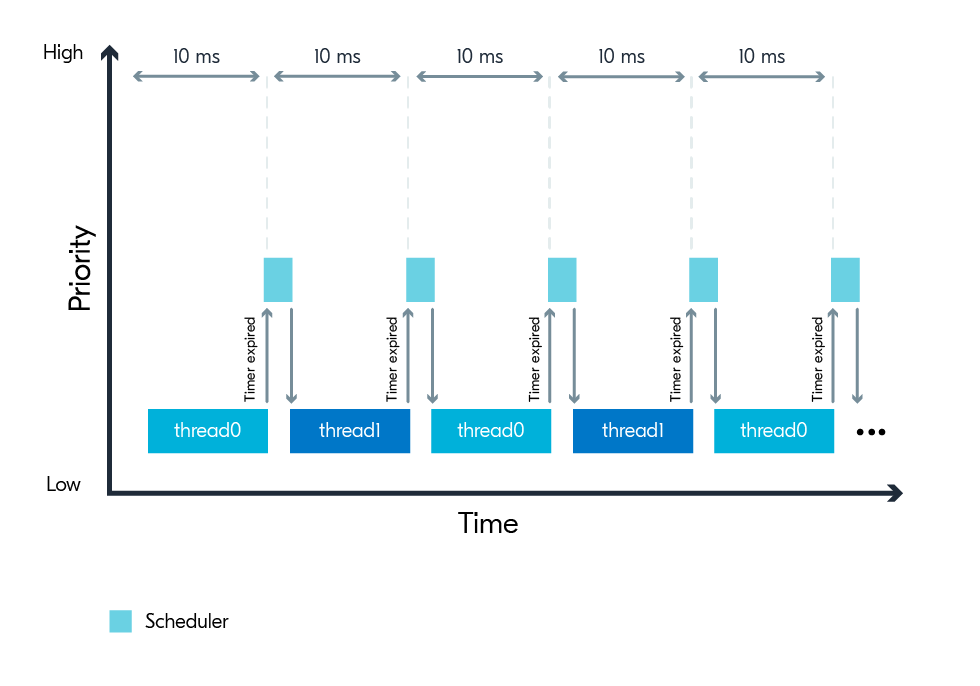
调度程序在 thread0 运行 10 毫秒后强制抢占它,并让 thread1 运行 10 毫秒,之后 thread1 被抢占以再次为 thread0 提供时间。
需要注意的是,时间片配置仅影响同优先级线程。那么,当启用时间片轮转且在时间片到期后没有同优先级线程可以运行时,会发生什么呢?
我们可以通过提高其中一个线程的优先级(即降低优先级数值)来找出答案。
5. 将 THREAD0_PRIORITY 的值更改为 6,如下所示,使 thread0 的优先级高于 thread1。
#define THREAD0_PRIORITY 6
#define THREAD1_PRIORITY 76. 编译应用程序并将其烧录到您的开发套件中。使用串口终端,您现在应该从输出中看到 thread0 不间断地运行,导致 thread1 永远饥饿。
尽管输出可能没有显示,但调度程序仍然每 10 毫秒抢占一次 thread0 ,以检查是否有任何其他处于“可运行”状态的同优先级或更高优先级线程。由于唯一的另一个线程 thread1 优先级较低,调度程序让 thread0 再运行一个时间片周期。由于 thread1 的优先级始终较低,thread0 将一直这样运行下去。
此练习的解决方案可以在 GitHub 仓库 l7/l7_e2_sol 中找到。
