

练习 3 – 工作队列创建与工作项提交
工作队列创建与工作项提交
由于高优先级线程有能力使其他低优先级线程处于饥饿状态,因此良好的做法是将这些线程中的所有非紧急执行任务卸载到低优先级线程中。
在本练习中,我们将创建并初始化一个工作队列,以从高优先级线程中卸载工作。
练习步骤
1. 在本课程的 GitHub 仓库中,打开此练习的基础代码,位于 l7/7_e3.
具有不同优先级的线程
2. 定义本练习中使用的三个线程优先级,使 thread0 的优先级高于 thread1。工作队列线程应具有最低优先级,因为我们希望该线程执行卸载的(非紧急)工作。请记住,高优先级对应于较小的数值。
#define THREAD0_PRIORITY 2
#define THREAD1_PRIORITY 3
#define WORKQ_PRIORITY 43. thread0 已在代码库中提供。它初始化内部数据结构 time_stamp 和 delta_time。然后,在 while 循环中,调用内核函数 k_uptime_get() 来获取时间戳。之后我们模拟一些工作,并使用 k_uptime_delta() 获取并打印完成这轮工作所需的时间。然后休眠 20 毫秒并不断重复。
void thread0(void)
{
    uint64_t time_stamp;
    int64_t delta_time;

    while (1) {
        time_stamp = k_uptime_get();
        emulate_work();
        delta_time = k_uptime_delta(&time_stamp);

        printk("thread0 yielding this round in %lld ms\n", delta_time);
        k_msleep(20);
    }
}4. thread1 应该执行完全相同的操作。为 thread1 添加以下代码:
void thread1(void)
{
    uint64_t time_stamp;
    int64_t delta_time;

    while (1) {
        time_stamp = k_uptime_get();
        emulate_work();
        delta_time = k_uptime_delta(&time_stamp);

        printk("thread1 yielding this round in %lld ms\n", delta_time);
        k_msleep(20);
    }
}请注意,由于该线程优先级较低,它处理 emulate_work() 的时间会更少。
5. 在线程入口函数之前,定义一个内联函数来模拟处理循环且不让出(yield)或休眠的工作。
static inline void emulate_work()

{
	for(volatile int count_out = 0; count_out < 300000; count_out ++);
}在运行频率为 128 MHz 的 nRF54L15 SoC 上,此函数大约需要 ~24 毫秒完成。在 64 MHz 的 nRF52840 SoC 上,所需时间应翻倍。
6. 构建应用程序并将其烧录到您的开发套件中。使用串口终端,您现在应该看到以下输出:
*** Booting nRF Connect SDK ***
*** Using Zephyr OS ***
thread0 yielding this round in 23 ms
thread0 yielding this round in 24 ms
thread1 yielding this round in 50 ms
thread0 yielding this round in 23 ms
thread0 yielding this round in 23 ms
thread1 yielding this round in 50 ms
thread0 yielding this round in 24 ms
thread0 yielding this round in 23 ms
thread1 yielding this round in 50 ms
thread0 yielding this round in 23 ms您可以看到,高优先级的 thread0 在大约 23-26 毫秒内完成了任务 emulate_work,但 thread1 花费的时间是其两倍多。这是因为 thread0 一直在阻塞 thread1。
线程的时间线应如下图所示:
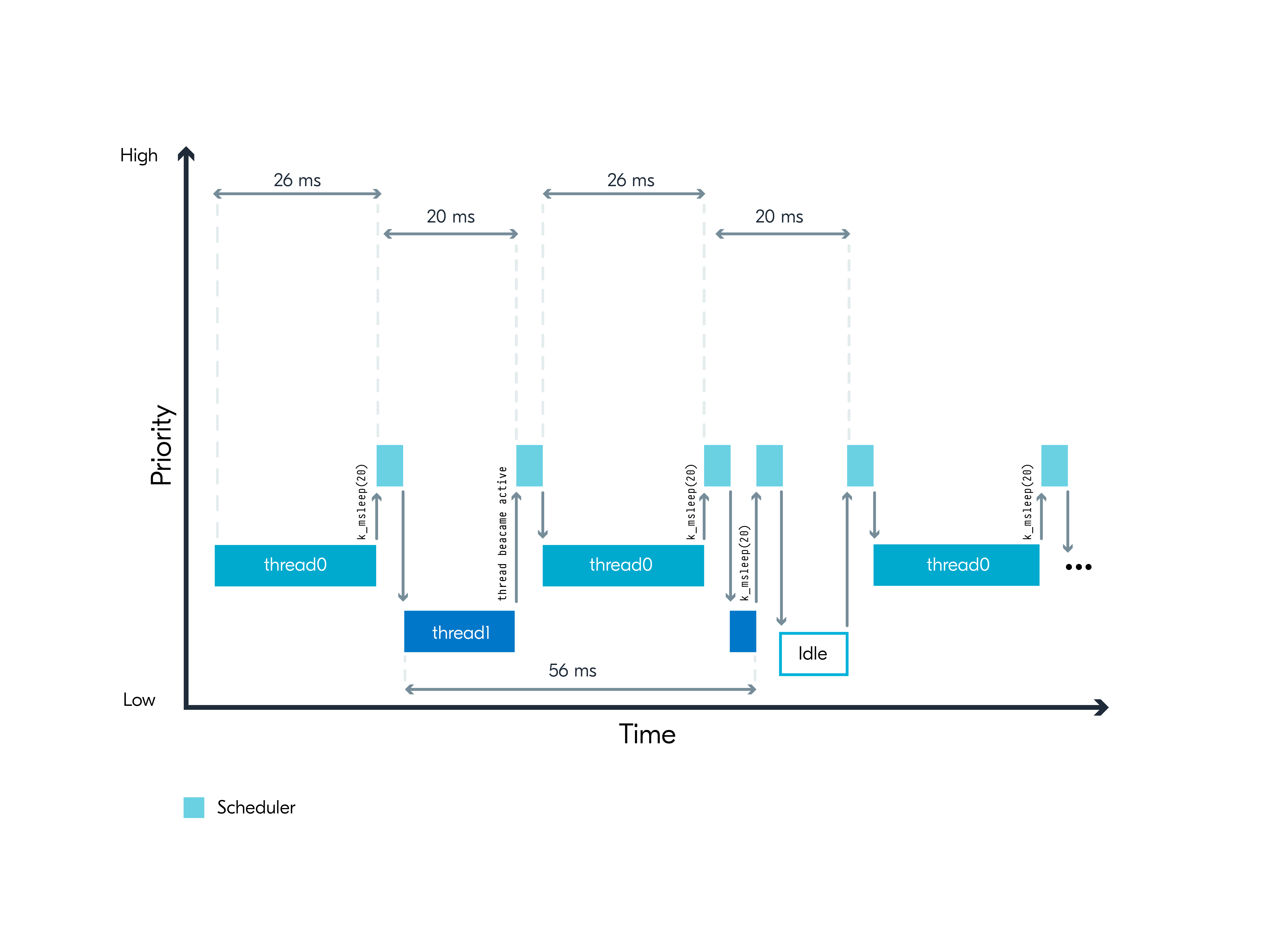
从高优先级任务卸载工作
由于 thread0 正在处理非紧急工作,因此仅为了执行此工作而阻塞其他线程并不是良好的做法。让我们将非紧急的 emulate_work() 卸载到低优先级的工作队列线程中。
7. 我们需要将我们的工作(emulate_work())关联为一个工作项,并将其推送到特定的工作队列。这是通过创建一个 work_info 结构和一个应仅运行 emulate_work() 的函数 offload_function() 来完成的。
struct work_info {
    struct k_work work;
    char name[25];
} my_work;

void offload_function(struct k_work *work_term)
{
	emulate_work();
}8. 在 thread0 的入口函数中,使用 k_work_queue_start() 启动工作队列。然后使用 k_work_init() 初始化工作项,将工作项与其处理程序 offload_function() 连接起来。
k_work_queue_start(&offload_work_q, my_stack_area,
                   K_THREAD_STACK_SIZEOF(my_stack_area), WORKQ_PRIORITY,
                   NULL);

strcpy(my_work.name, "Thread0 emulate_work()");
k_work_init(&my_work.work, offload_function);9. 不要在 while 循环中运行 emulate_work,而是使用以下方式向工作队列提交工作项: k_work_submit_to_queue()
k_work_submit_to_queue(&offload_work_q, &my_work.work);thread0 现在正将 emulate_work() 的处理卸载到低优先级的辅助线程中,这意味着它在进入休眠(20 毫秒)之前,在此高优先级上下文中处理的内容会更少。反过来,这应该会为 thread1 带来更多的处理时间(因为来自 thread0 的中断更少)。
10. 构建应用程序并将其烧录到您的开发套件中。使用串口终端,您应该看到以下输出:
*** Booting nRF Connect SDK ***
*** Using Zephyr OS ***
thread0 yielding this round in 0 ms
thread0 yielding this round in 0 ms
thread1 yielding this round in 26 ms
thread0 yielding this round in 0 ms
thread0 yielding this round in 0 ms
thread1 yielding this round in 26 ms
thread0 yielding this round in 0 ms
thread0 yielding this round in 0 ms
thread1 yielding this round in 27 ms
thread0 yielding this round in 0 ms
thread0 yielding this round in 0 ms
thread1 yielding this round in 27 ms
thread0 yielding this round in 0 ms
thread0 yielding this round in 0 ms上述日志是在运行频率为 128 MHz 的 nRF54L15 DK 上运行的。如果在 64 MHz SoC 上运行,所需时间应为上述日志中显示的两倍。
线程的时间线看起来像这样

如您所见,thread0 现在在休眠前不到一毫秒的时间内完成了一轮工作,从而为其他较低优先级的线程提供了更多的运行时间。这对于 thread0 来说是可以接受的,因为它可以接受推迟执行 emulate_work()。此外,请注意,与 thread0 未使用工作队列卸载工作的场景相比,thread1 现在完成其一轮工作处理所需的时间要少得多。这是一个良好架构的示例,因为我们只保留紧急工作在高优先级中处理,而非紧急工作则被卸载到适当的低优先级中。作为 RTOS 上的应用程序设计者,您应该了解内核为应用程序提供的服务,并充分利用它们,以避免不必要的延迟。
此练习的解决方案可以在 GitHub 仓库 l7/l7_e3_sol 中找到。
