Exercise 1 – Powering nRF54L devices from a single AA/AAA battery
In this exercise, you will learn how to power an nRF54L SoC from a single 1.5 V AA or AAA battery using the nPM2100 PMIC.
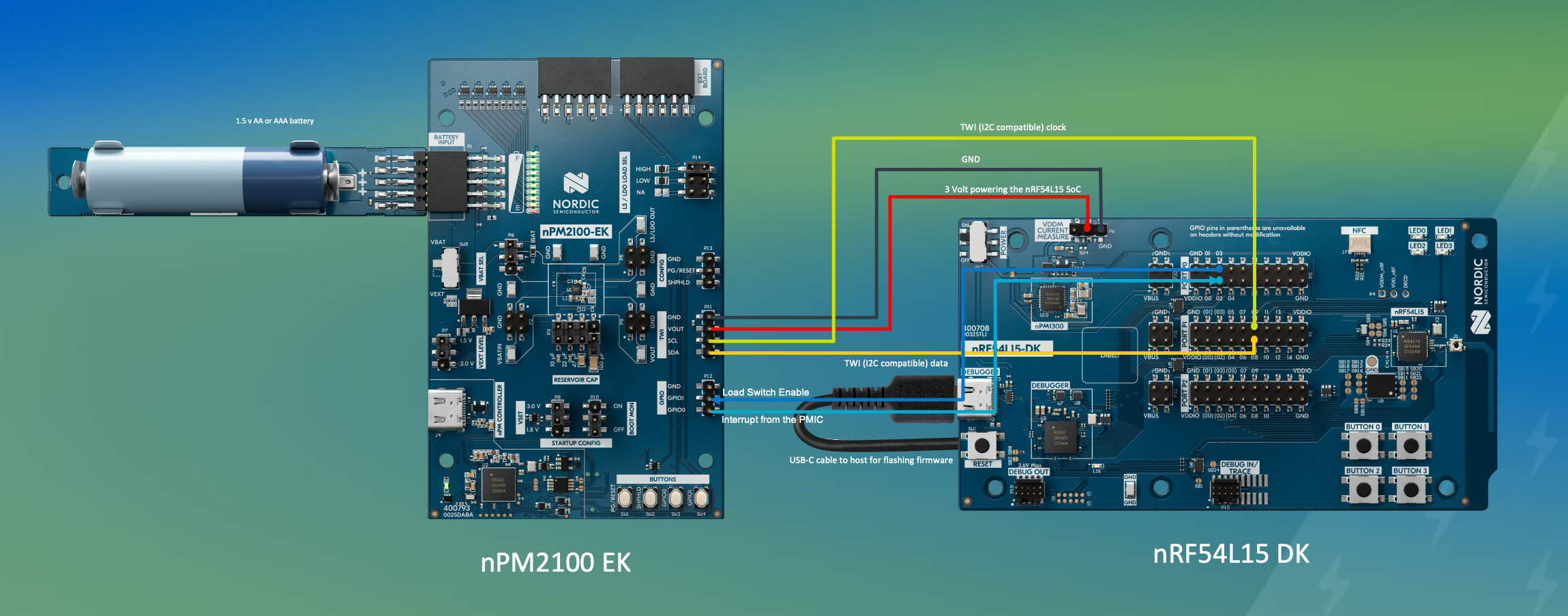
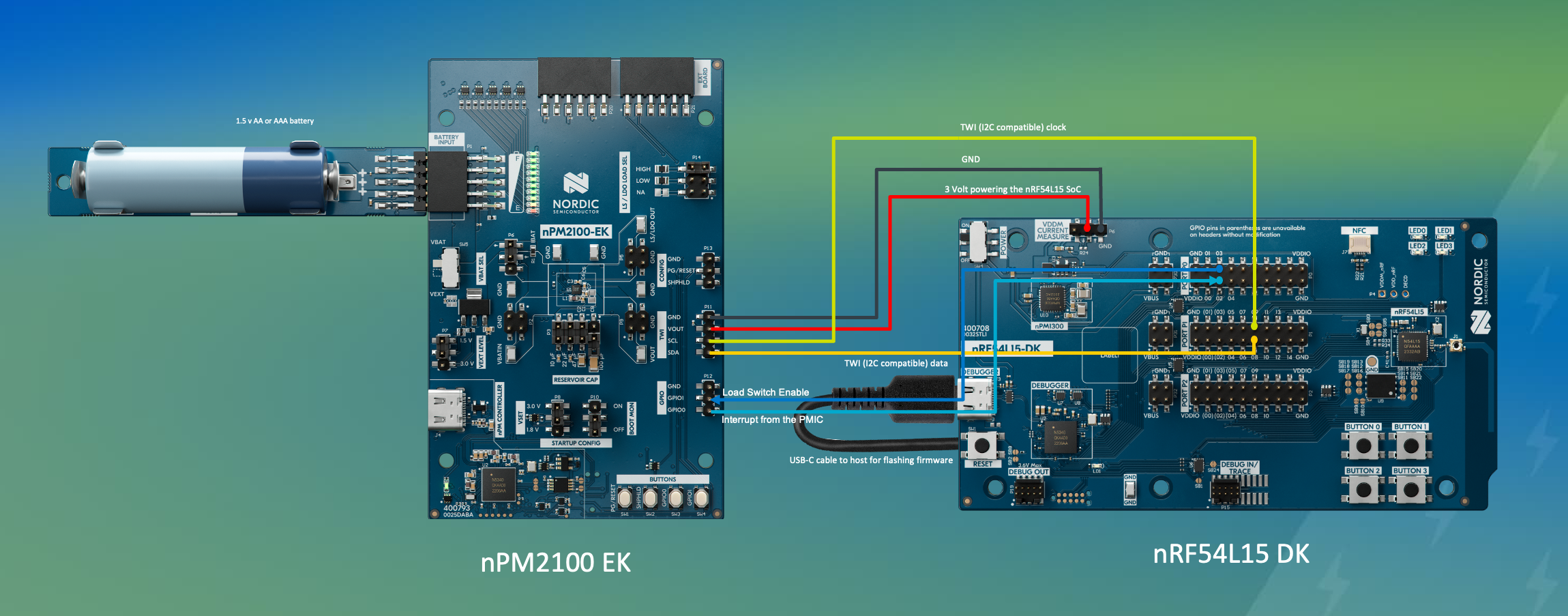
nPM2100 EK to nRF54L15 DK connection diagram
You will first create and export a configuration for the nPM2100 PMIC using the nPM PowerUP app (from nRF Connect for Desktop). Then, you will integrate this configuration into an nRF Connect SDK application.
After that, you will familiarize yourself with some Zephyr Driver APIs to further deepen your understanding of the development process for Nordic’s PMICs.
The application running on the nRF54L SoC will periodically pull information from the PMIC about the battery voltage and the boost regulator output, and advertise it as a Bluetooth LE non-connectable advertisement so that it can be displayed on a smartphone/tablet running nRF Connect for Mobile.
Note
This exercise has limited support for the following SoCs:
nRF54LV10: The SoC is not supported in this exercise as it is a unique SoC in the nRF54L Series with built-in support for 1.2-1.7 V supply for Continuous Glucose Monitoring (CGM) devices.
Special hardware requirements
You will need the following extra hardware to complete this exercise
The starting point is an nRF54L SoC that requires power from a single AA or AAA battery. Since the voltage of an AA/AAA battery is below the nRF54L supply voltage range (1.7 – 3.6 V), you need a boost converter. Adding the nPM2100 PMIC to this design is the ideal choice. In addition to a high-efficiency boost converter, this PMIC also integrates a lot of features useful for system management and user interaction.
In this exercise, you will design an application that includes the system power management. It also has the following features:
A button (SHPHLD) that distinguishes three button push lengths.
The PMIC’s second regulator (LDO/LDSW) in Load Switch mode, with on/off control by a GPIO.
With this setup, you can accept different modes of user interaction with the device through a single button and provide a feedback using, for example, an LED or a haptic motor wired to the LDSW output.
1. Configure the nPM2100 in the nPM PowerUP
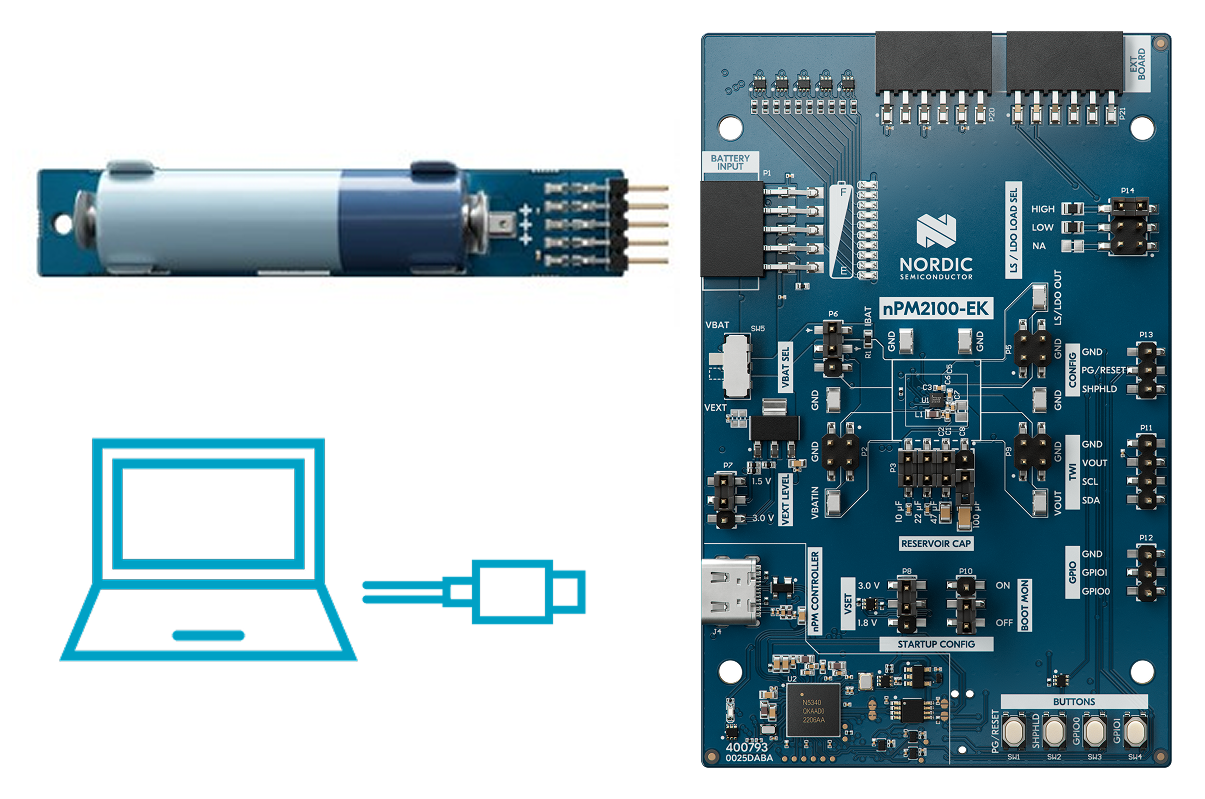
1.1 Insert the AAA or AA battery holder add-on board, with the battery installed, into the nPM2100 Evaluation Kit and connect the “nPM Controller” port to your computer with a USB-C cable.
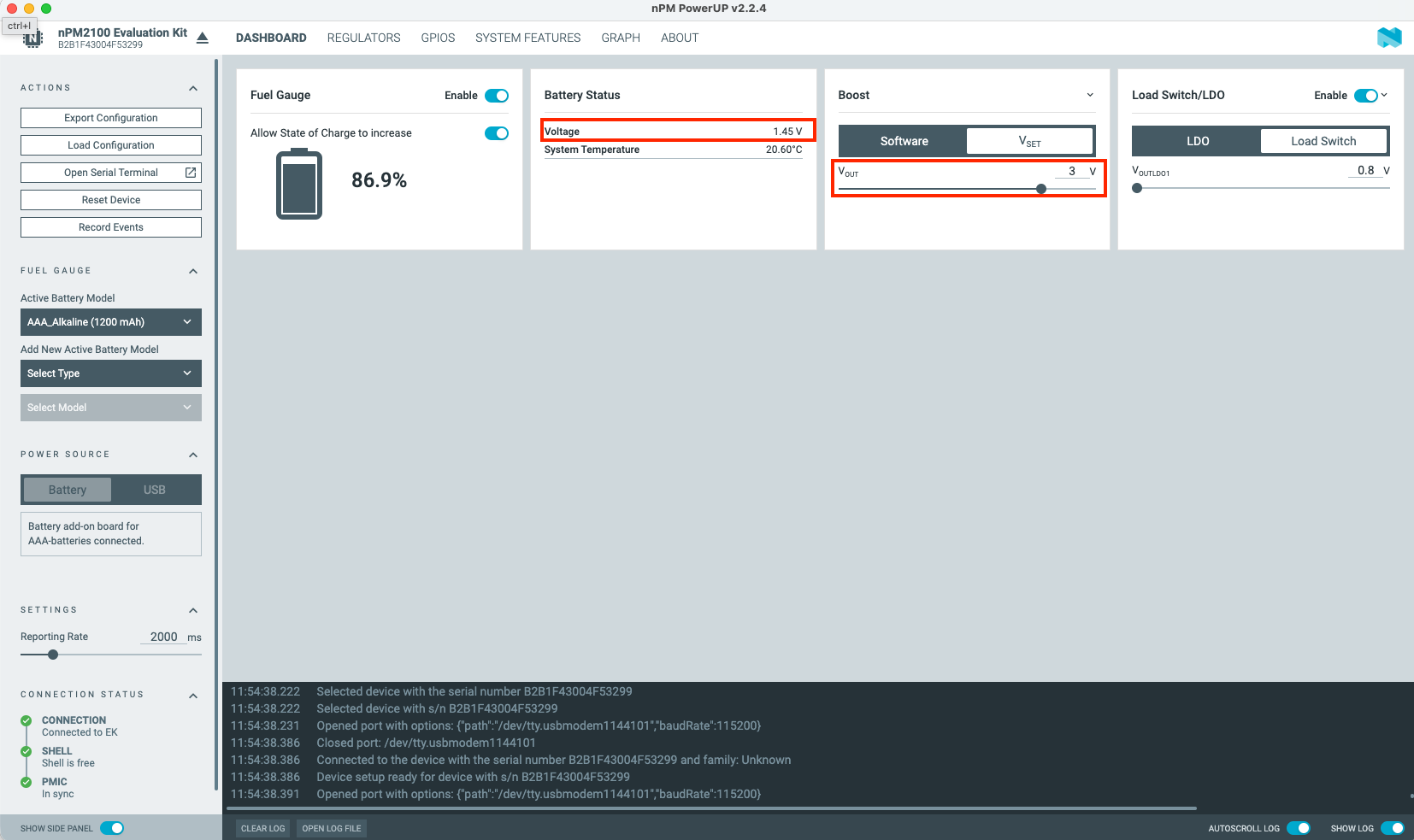
1.3 On the DASHBOARD tab of the application, you can see the battery voltage measurements, as well as the nPM2100 Boost regulator voltage setting, which you can keep at the default level or adjust as desired.
nPM PowerUP – dashboard – battery measurements and Boost settings
1.4 In the nPM PowerUP GUI, configure the following. You can learn more about each configuration option by simply hovering your mouse over them.
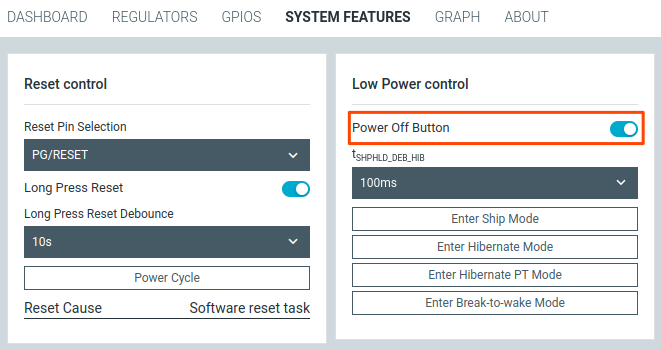
1.4.1 In the SYSTEM FEATURES tab, make sure that the Power Off Button function is enabled. This setting instructs the PMIC to enter Ship mode when the SHPHLD button is pressed for longer than two seconds.
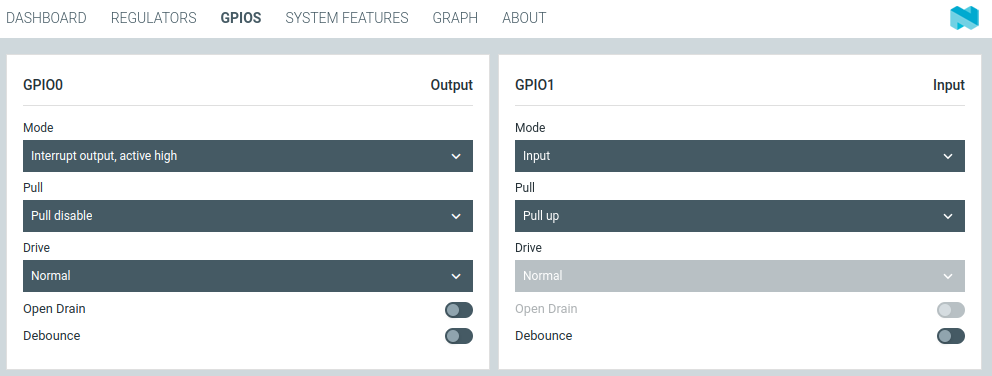
1.4.2 In the GPIOS tab, match the GPIO settings with the following screenshot:
GPIO0 – active-high interrupt output – this GPIO will signal PMIC interrupts to the host SoC.
GPIO1 – input with a pull-up – this GPIO will act as a control input for the LDSW regulator allowing the host SoC to enable or disable the regulator without TWI communication.
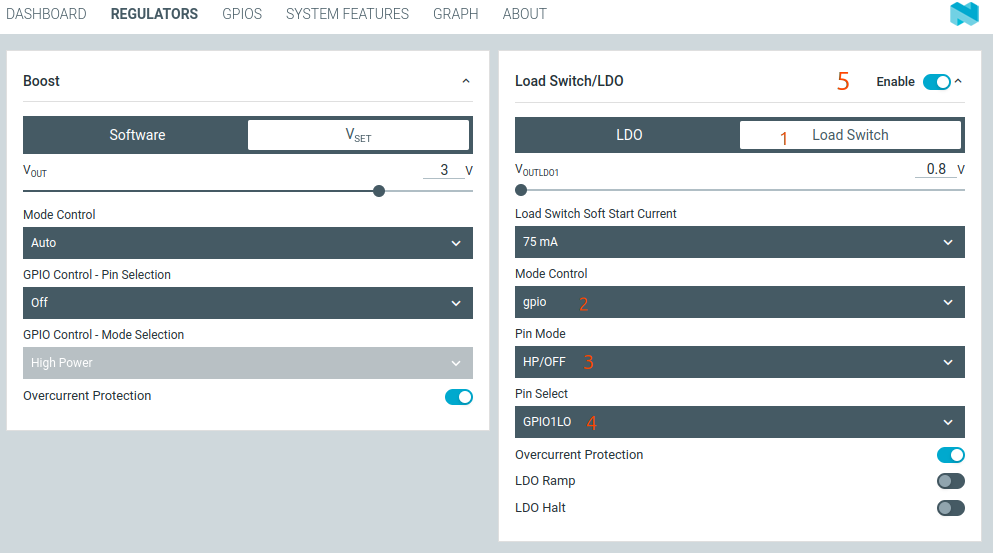
1.4.3 In the REGULATORS tab, configure the Load Switch regulator.
These options allow the Load Switch regulator to be controlled by the state of the GPIO1 pin configured earlier.
1.5 Test the functionality of the settings.
Hold down the GPIO1 button to enable the Load Switch regulator. Check the Voltage graph in the GRAPH tab for a drop to confirm this (a high load is set by default in header P14 on the nPM2100 EK).
Voltage drop while holding the GPIO1 button
As for the ship mode testing using the SHPHLD button, we will perform this as the last step in this exercise.
2. Export the configuration.
Now that you have configured the PMIC, save the configuration to use it in your nRF Connect SDK project.
2.1 Click the Export Configuration button in the upper left corner of the nPM PowerUP, and navigate to the l2_e1 directory inside the cloned GitHub repository for this course.
2.2 Change the filename to npm2100_pmic.overlay to identify it later.
Export PMIC settings
3. Integrate the PMIC configuration into the project
Now that the PMIC configuration has been completed and exported, you need to do the following steps:
Close the nPM PowerUP application window.
You must disconnect the USB cable from the nPM Controller port on the EK, as the nPM Controller would interfere with the EK to DK communication we will set up in step 5.2
You will now start configuring and building an nRF Connect SDK application. The nRF54L SoC will be powered by and communicate via TWI (I2C-compatible) with the nPM2100 PMIC on the nPM2100 EK.
ret = sensor_sample_fetch(npm2100_adc);if (ret < 0) {LOG_ERR("failed to fetch (%d)", ret);return ret;}
C
4.2.2 Get the SENSOR_CHAN_GAUGE_VOLTAGE channel result into vbat.
Copy
ret = sensor_channel_get(npm2100_adc, SENSOR_CHAN_GAUGE_VOLTAGE, vbat);if (ret < 0) {LOG_ERR("failed to get gauge voltage channel (%d)", ret);return ret;}
C
4.2.3 Get the SENSOR_CHAN_VOLTAGE channel result into vout.
Copy
ret = sensor_channel_get(npm2100_adc, SENSOR_CHAN_VOLTAGE, vout);if (ret < 0) {LOG_ERR("failed to get voltage channel (%d)", ret);return ret;}
C
5. Build and flash the application.
5.1 Build the application
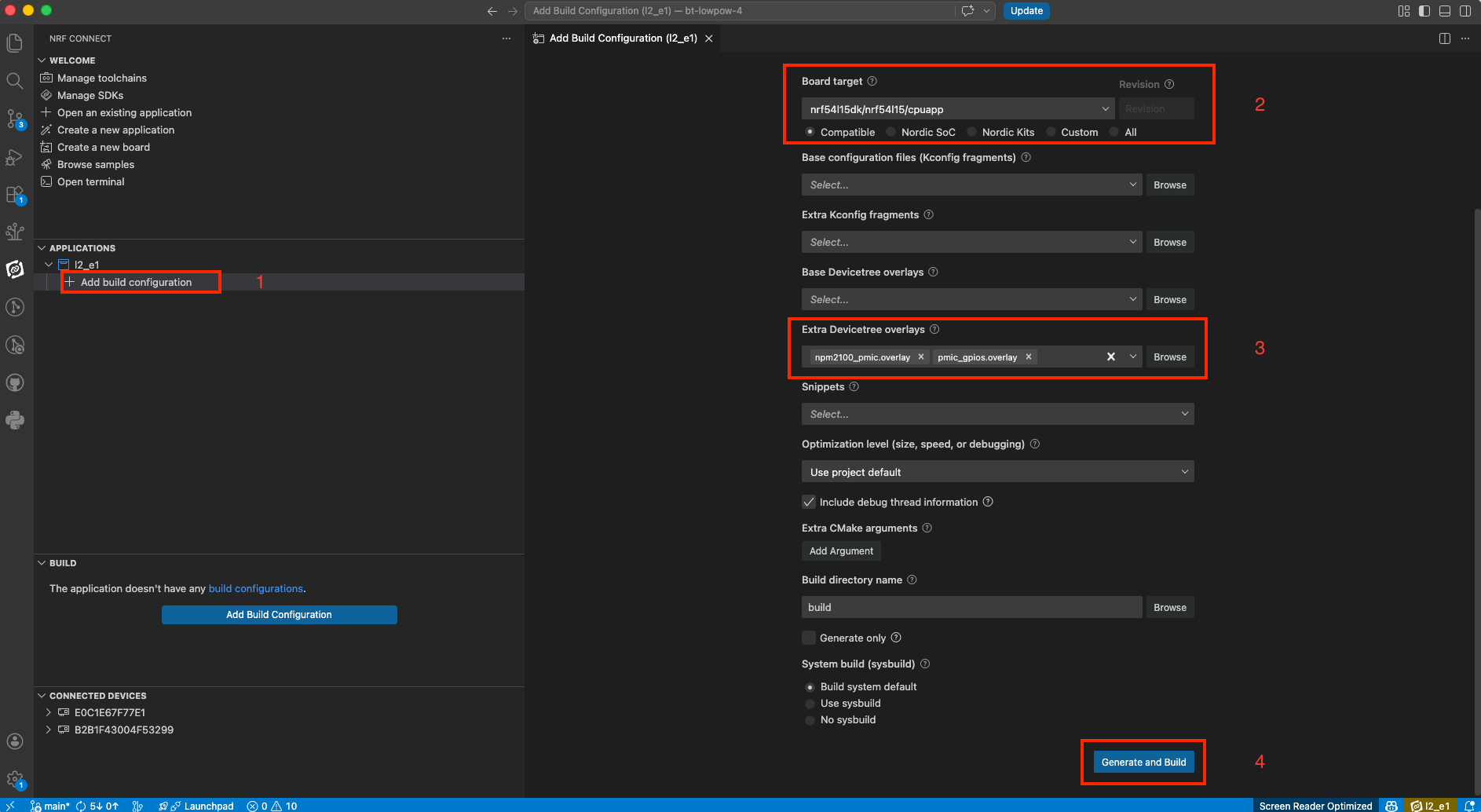
Now that the application is ready, add a build configuration for your board target. In the screenshot below, we are assuming an nRF54L15 DK board.
Make sure you include thenpm2100_pmic.overlay&pmic_gpios.overlayas Extra Devicetree overlays as shown in the screenshot below:
Then, click on Generate and build
5.2 Connect the nPM2100 EK to your nRF54L DK (nRF54L15 DK | nRF54LM20 DK | nRF54LS05 DK)
To test your application, connect the DK to the nPM2100 EK as shown in the figure/table below. Make sure to remove the jumper on the “VDD Current Measure” header to allow the nPM2100 to power the nRF54L Series SoC instead of using the DK’s onboard power supply.
“VDD Current Measure” header, nRF54 (middle pin) .
GND
GND
Two-wire interface
SDA
P1.08
SCL
P1.09
PMIC interrupt GPIO
GPIO0
P0.02
Load Switch control GPIO
GPIO1
P0.03
This way, the nPM2100 PMIC powers the nRF54L15 SoC, ensuring the correct IO reference for the TWI. The PMIC GPIOs are connected to the SoC GPIOs for interrupt signaling and LDSW control.
5.3 Flash the application to your nRF54L DK
Note
Use a USB-C cable to flash the nRF54L DK with the application.
After flashing, you can remove the USB-C cable from the development kit, and the nRF54L SoC will continue to operate (you will see the Bluetooth LE advertisements in the next step). However, without a USB cable there may be some leakage current to the debugger and other components on some older version DKs.
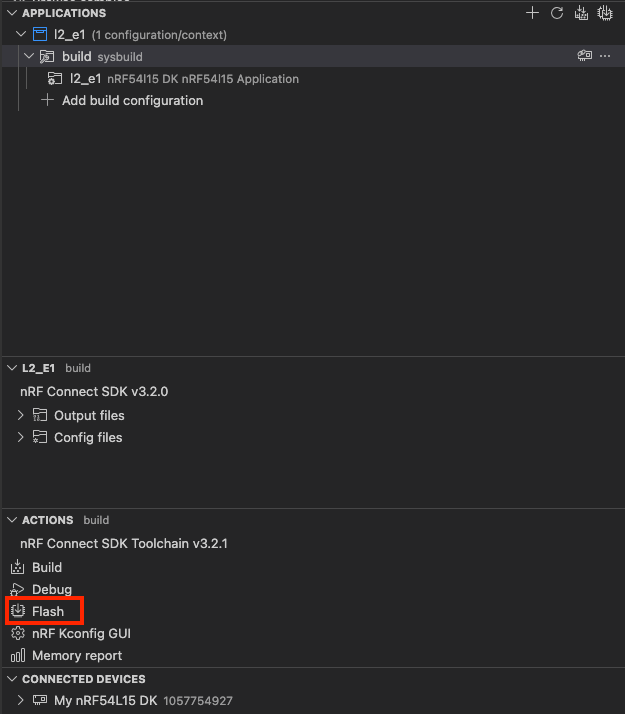
Flash the application to your DK using the nRF Connect for VS Code extension(ACTIONS-> Flash).
Flashing the application to the development kit
6. Testing using nRF Connect for Mobile
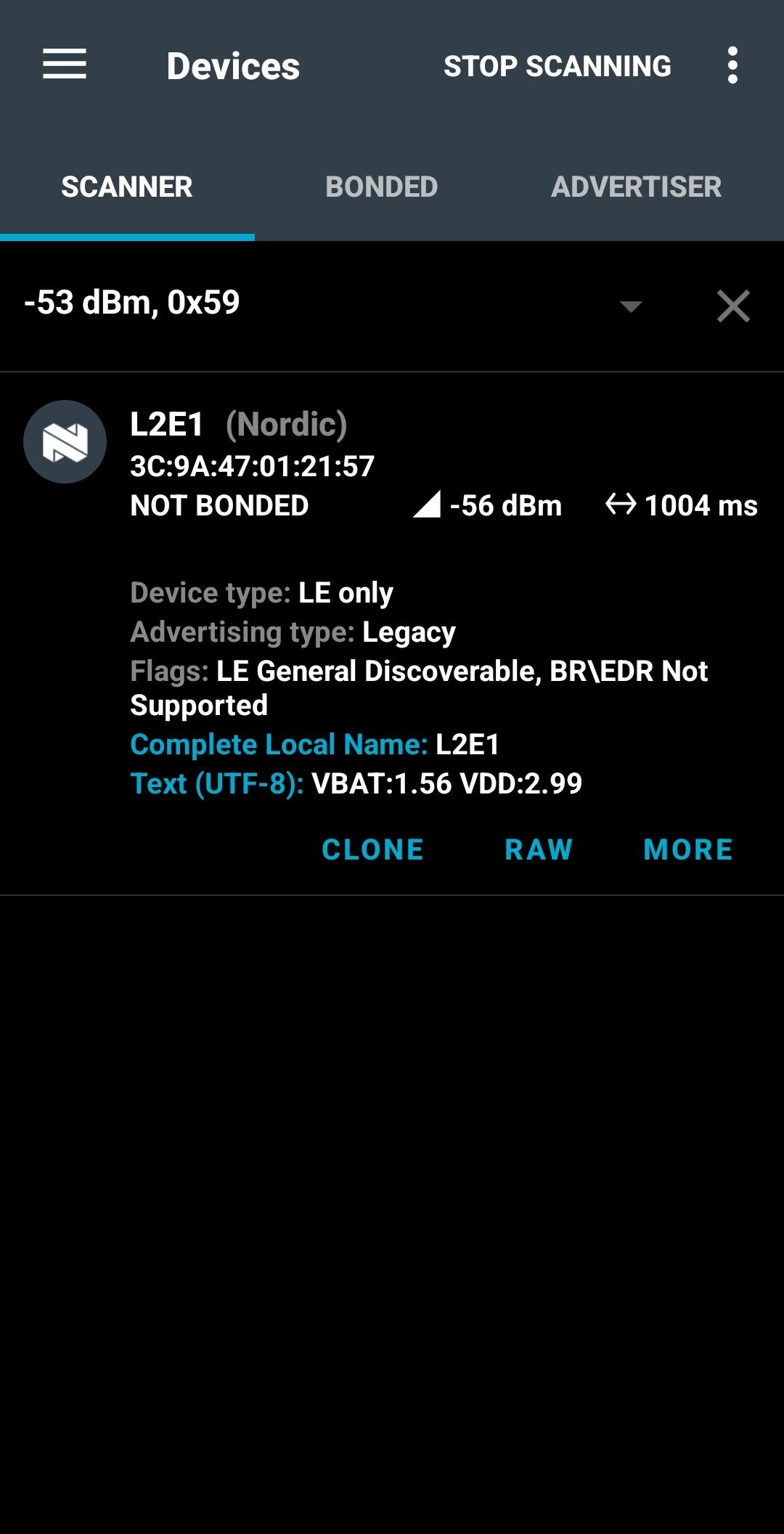
Open nRF Connect for Mobile (Android and iOS) and scan for devices, you should see an advertising Device called L2E1. The nRF54L SoC is configured to advertise both the battery voltage (VBAT) and VDD voltage powering the SoC as manufacturer-specific data. Both of these readings are obtained from the nPM2100 PMIC.
Important
On nRF Connect for Mobile (Android version), you can change the format of manufacturer-specific data from raw hex to Text (UTF-8) by pressing on the the raw hex data. On iOS, this feature is not supported; the data displays as raw hex only. In that case, manually copy the raw hex data (e.g., using Chrome browser: chrome://bluetooth-internals/#devices, scan for devices, locate the L2E1 device), then use an online tool to convert hex to UTF-8)
The SW controls the following:
Pressing the SHPHLD button shortly will cause the LDSW to output a single 0.5 s pulse.
Pressing and holding the SHPHLD button for at least 0.5 s will produce two pulses, each 0.25 s in duration (4 Hz).
The HW is configured to “power off” (PMIC enters the Ship mode), when the SHPHLD button is held for longer than two seconds. This will unpower the nRF54L15 DK as well, so no further advertisement is seen in the nRF Connect for Mobile. To power the system back on, hold the button again for longer than two seconds.
Nordic Developer Academy Privacy Policy
1. Introduction
In this Privacy Policy you will find information on Nordic Semiconductor ASA (“Nordic Semiconductor”) processes your personal data when you use the Nordic Developer Academy.
References to “we” and “us” in this document refers to Nordic Semiconductor.
2. Our processing of personal data when you use the Nordic Developer Academy
2.1 Nordic Developer Academy
Nordic Semiconductor processes personal data in order to provide you with the features and functionality of the Nordic Developer Academy. Creating a user account is optional, but required if you want to track you progress and view your completed courses and obtained certificates. If you choose to create a user account, we will process the following categories of personal data:
Email
Name
Password (encrypted)
Course progression (e.g. which course you have completely or partly completed)
Certificate information, which consists of name of completed course and the validity of the certificate
Course results
During your use of the Nordic Developer Academy, you may also be asked if you want to provide feedback. If you choose to respond to any such surveys, we will also process the personal data in your responses in that survey.
The legal basis for this processing is GDPR article 6 (1) b. The processing is necessary for Nordic Semiconductor to provide the Nordic Developer Academy under the Terms of Service.
2.2 Analytics
If you consent to analytics, Nordic Semiconductor will use Google Analytics to obtain statistics about how the Nordic Developer Academy is used. This includes collecting information on for example what pages are viewed, the duration of the visit, the way in which the pages are maneuvered, what links are clicked, technical information about your equipment. The information is used to learn how Nordic Developer Academy is used and how the user experience can be further developed.
2.2 Newsletter
You can consent to receive newsletters from Nordic from within the Nordic Developer Academy. How your personal data is processed when you sign up for our newsletters is described in the Nordic Semiconductor Privacy Policy.
3. Retention period
We will store your personal data for as long you use the Nordic Developer Academy. If our systems register that you have not used your account for 36 months, your account will be deleted.
4. Additional information
Additional information on how we process personal data can be found in the Nordic Semiconductor Privacy Policy and Cookie Policy.
Nordic Developer Academy Terms of Service
1. Introduction
These terms and conditions (“Terms of Use”) apply to the use of the Nordic Developer Academy, provided by Nordic Semiconductor ASA, org. nr. 966 011 726, a public limited liability company registered in Norway (“Nordic Semiconductor”).
Nordic Developer Academy allows the user to take technical courses related to Nordic Semiconductor products, software and services, and obtain a certificate certifying completion of these courses. By completing the registration process for the Nordic Developer Academy, you are agreeing to be bound by these Terms of Use.
These Terms of Use are applicable as long as you have a user account giving you access to Nordic Developer Academy.
2. Access to and use of Nordic Developer Academy
Upon acceptance of these Terms of Use you are granted a non-exclusive right of access to, and use of Nordic Developer Academy, as it is provided to you at any time. Nordic Semiconductor provides Nordic Developer Academy to you free of charge, subject to the provisions of these Terms of Use and the Nordic Developer Academy Privacy Policy.
To access select features of Nordic Developer Academy, you need to create a user account. You are solely responsible for the security associated with your user account, including always keeping your login details safe.
You will able to receive an electronic certificate from Nordic Developer Academy upon completion of courses. By issuing you such a certificate, Nordic Semiconductor certifies that you have completed the applicable course, but does not provide any further warrants or endorsements for any particular skills or professional qualifications.
Nordic Semiconductor will continuously develop Nordic Developer Academy with new features and functionality, but reserves the right to remove or alter any existing functions without notice.
3. Acceptable use
You undertake that you will use Nordic Developer Academy in accordance with applicable law and regulations, and in accordance with these Terms of Use. You must not modify, adapt, or hack Nordic Developer Academy or modify another website so as to falsely imply that it is associated with Nordic Developer Academy, Nordic Semiconductor, or any other Nordic Semiconductor product, software or service.
You agree not to reproduce, duplicate, copy, sell, resell or in any other way exploit any portion of Nordic Developer Academy, use of Nordic Developer Academy, or access to Nordic Developer Academy without the express written permission by Nordic Semiconductor. You must not upload, post, host, or transmit unsolicited email, SMS, or \”spam\” messages.
You are responsible for ensuring that the information you post and the content you share does not;
contain false, misleading or otherwise erroneous information
infringe someone else’s copyrights or other intellectual property rights
contain sensitive personal data or
contain information that might be received as offensive or insulting.
Such information may be removed without prior notice.
Nordic Semiconductor reserves the right to at any time determine whether a use of Nordic Developer Academy is in violation of its requirements for acceptable use.
Violation of the at any time applicable requirements for acceptable use may result in termination of your account. We will take reasonable steps to notify you and state the reason for termination in such cases.
4. Routines for planned maintenance
Certain types of maintenance may imply a stop or reduction in availability of Nordic Developer Academy. Nordic Semiconductor does not warrant any level of service availability but will provide its best effort to limit the impact of any planned maintenance on the availability of Nordic Developer Academy.
5. Intellectual property rights
Nordic Semiconductor retains all rights to all elements of Nordic Developer Academy. This includes, but is not limited to, the concept, design, trademarks, know-how, trade secrets, copyrights and all other intellectual property rights.
Nordic Semiconductor receives all rights to all content uploaded or created in Nordic Developer Academy. You do not receive any license or usage rights to Nordic Developer Academy beyond what is explicitly stated in this Agreement.
6. Liability and damages
Nothing within these Terms of Use is intended to limit your statutory data privacy rights as a data subject, as described in the Nordic Developer Academy Privacy Policy. You acknowledge that errors might occur from time to time and waive any right to claim for compensation as a result of errors in Nordic Developer Academy. When an error occurs, you shall notify Nordic Semiconductor of the error and provide a description of the error situation.
You agree to indemnify Nordic Semiconductor for any loss, including indirect loss, arising out of or in connection with your use of Nordic Developer Academy or violations of these Terms of Use. Nordic Semiconductor shall not be held liable for, and does not warrant that (i) Nordic Developer Academy will meet your specific requirements, (ii) Nordic Developer Academy will be uninterrupted, timely, secure, or error-free, (iii) the results that may be obtained from the use of Nordic Developer Academy will be accurate or reliable, (iv) the quality of any products, services, information, or other material purchased or obtained by you through Nordic Developer Academy will meet your expectations, or that (v) any errors in Nordic Developer Academy will be corrected.
You accept that this is a service provided to you without any payment and hence you accept that Nordic Semiconductor will not be held responsible, or liable, for any breaches of these Terms of Use or any loss connected to your use of Nordic Developer Academy. Unless otherwise follows from mandatory law, Nordic Semiconductor will not accept any such responsibility or liability.
7. Change of terms
Nordic Semiconductor may update and change the Terms of Use from time to time. Nordic Semiconductor will seek to notify you about significant changes before such changes come into force and give you a possibility to evaluate the effects of proposed changes. Continued use of Nordic Developer Academy after any such changes shall constitute your acceptance of such changes. You can review the current version of the Terms of Use at any time at https://academy.nordicsemi.com/terms-of-service/
8. Transfer of rights
Nordic Semiconductor is entitled to transfer its rights and obligation pursuant to these Terms of Use to a third party as part of a merger or acquisition process, or as a result of other organizational changes.
9. Third Party Services
To the extent Nordic Developer Academy facilitates access to services provided by a third party, you agree to comply with the terms governing such third party services. Nordic Semiconductor shall not be held liable for any errors, omissions, inaccuracies, etc. related to such third party services.
10. Dispute resolution
The Terms of Use and any other legally binding agreement between yourself and Nordic Semiconductor shall be subject to Norwegian law and Norwegian courts’ exclusive jurisdiction.
Switch language?
Progress is tracked separately for each language. Switching will continue from your progress in that language or start fresh if you haven't begun.
Your current progress is saved, and you can switch back anytime.
•This patch release is part of the v3.4 release branch, which has long-term support (LTS) for a period of five years.
•During this period, patch releases will provide updates for security vulnerabilities and critical bug fixes.
•API stability is guaranteed; breaking changes are only introduced when required by a security fix.
•Added the release.yaml file with device classification support overview
Device support
•Experimental support for the nRF54LC10A SoC.
MCUboot
•The build system no longer requires dedicated slots for the network core update candidate(nRF5340 SoC Only) •Support for compiling multiple image verification keys into MCUboot
General updates for nRF Connect SDK v3.4.0
•This release includes Long-Term Support (LTS) for five years.
•Patch (minor) releases will address security vulnerabilities and critical bug fixes.
•API stability is guaranteed; breaking changes are only introduced when required by a security fix.
•Notifications for critical bug fixes and security updates via the myNordic notification system (mynordic.nordicsemi.com)
General updates
•Support for nRF54LS05 DK (Available through the early access sampling program) •Support for the nRF54LM20B with Axon NPU for Edge AI applications
Bluetooth LE updates
•Quality of Service module is now production-ready. •New experimental features for RF testing (Direct Test Mode) and low-latency packet handling (LE Flushable ACL).
MCUboot & Partition Manager
•Single-Slot DFU and RAM Load mode are both promoted to fully supported •Partition Manager is officially deprecated in favor of Zephyr's devicetree-based partitioning.