The comparator peripheral (COMP) compares two voltage inputs against each other.
The nRF54L Series is also equipped with a low-power variant of the comparator (LPCOMP). The LPCOMP has a reduced list of features in order to decrease the device’s current consumption. In addition, it can run in the System OFF power state and be used as a wake-up source.
The nRF54L Series has up to 8x analog input pins, labeled AIN0 to AIN7, which can be used for voltage comparison.
Depending on the comparator operation mode, these inputs can be used for positive (VIN+) and negative (VIN-) voltage inputs. Analog inputs must operate in the 0 to VDD voltage range.
The comparators differ in operation modes and supported functionality. At any given time, only one comparator can be active.
Comparator
A comparator can work in the following operation modes:
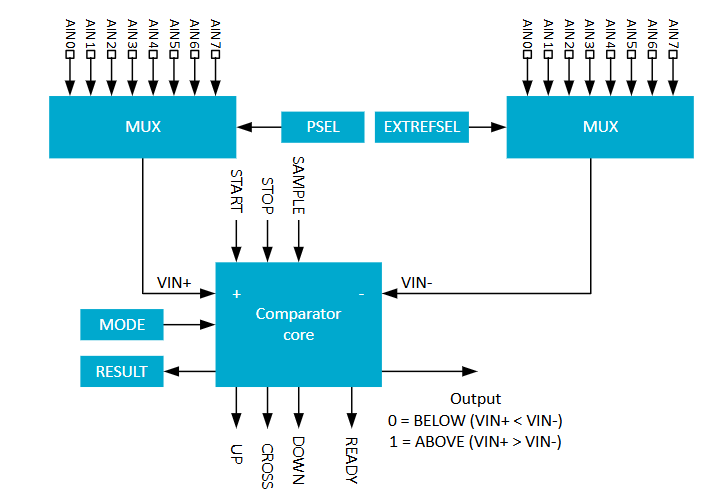
Differential mode – This mode involves comparing voltage levels supplied to the analog inputs. Both VIN+ and VIN- come from AIN0 to AIN7. The comparator generates ABOVE and BELOW events depending on the V+/V- ratio. Additionally, it is possible to enable a 40 mV hysteresis in this mode.
Figure 1. Comparator in differential mode
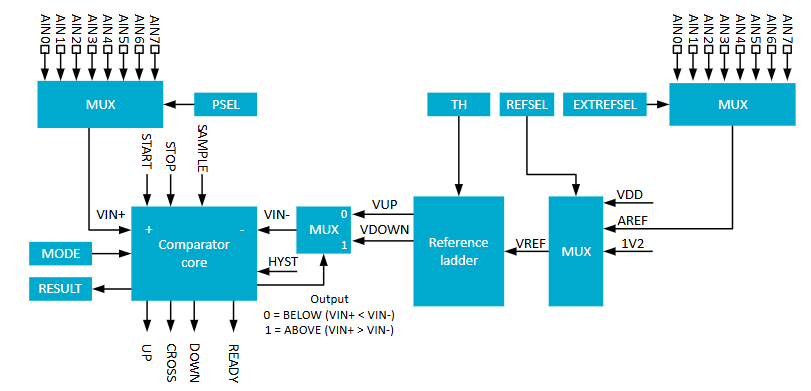
Single-endedmode – In this mode, the comparator compares the voltage at VIN+, sourced from any of the AIN0 to AIN7 analog inputs, against a negative voltage (VIN-), which comes from the reference voltage. The reference voltage can be derived from one of the available sources:
Any of the analog inputs AIN0 to AIN7
VDD
An internal 1.2V reference
In this mode, hysteresis is configurable by 64-steps reference ladder that uses the reference voltage (VREF) to derive two new voltage references: VUP and VDOWN. These additional references are the thresholds against which the input voltage is compared, in order to generate ABOVE and BELOW events.
Figure 2. Comparator in single-ended mode
Low-power comparator
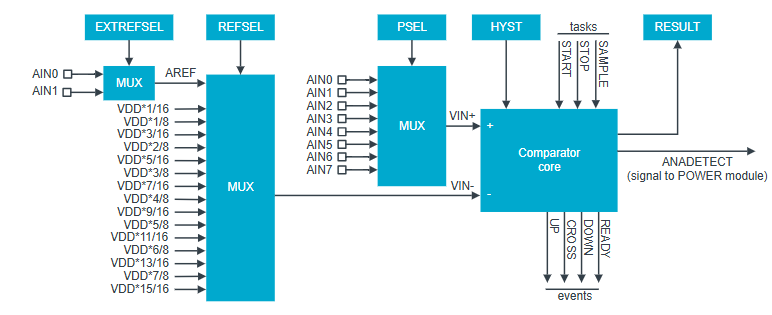
The low-power comparator can work only in Single-ended mode, and has certain limitations regarding voltage reference sources and configuration options.
The reference voltage for this comparator can be provided from only two sources:
Analog input – Only two analog inputs can be used as reference voltage: AIN0 & AIN1 .
VDD with a 16-steps reference ladder.
In this mode, it is possible to enable fixed hysteresis.
Figure 3. LPCOMP block diagram
For a cost of functional limitations, the low-power comparator offers the following advantages:
Provides ultra-low current consumption
Works in System OFF and acts as the system wake-up source
The nRF54L Series ADC supports three main resolution modes:
10-bit mode with a maximum sample rate of 2 Msps
12-bit mode with a sample rate of 250 ksps
14-bit mode with a sample rate of 31.25 ksps
It is possible to improve the accuracy by oversampling. Additional noise shaping modes provide the highest performance by enabling a delta-sigma configuration with analog filtering, oversampling, and digital filtering. Oversampling can be combined with burst mode, which combines all the samples and stores the average result in RAM.
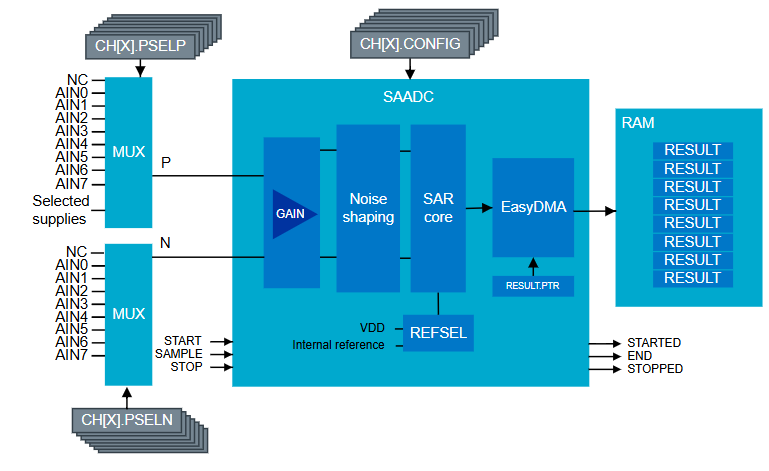
SAADC supports 8x channels and can work in both single-ended and differential modes. When COMP or LPCOMP is used together with ADC, it is not possible to use the same analog input pin for COMP/LPCOMP and SAADC.
Positive inputs can be selected from the following sources:
Analog pins AIN0-AIN7, which support a voltage range from 0V to VDD
Digital or analog internal voltage rails
VDD
Figure 4. Simplified ADC block diagram
Input voltage needs to be scaled to the range defined by the internal or external reference source voltage, with appropriate gain settings applied.
nRF54L Series ADC can be triggered by software or DPPI event with the sample frequency source from a low-power GRTC timer (32.768 kHz) or one of the 16 MHz timers. It works in one of the following operational modes:
One shot, one channel
One-shot scanning mode
Continuous, one channel
Continuous, scan
Notably, in the continuous scan mode, the peripheral performs continuous voltage conversion for selected channels and stores the results in RAM memory using easyDMA. This mode can be triggered by an internal ADC timer or by any general purpose timer through the PPI system. This mode can be used only when burst mode is enabled.
Additionally, SAADC supports live limit checking, which generates events when the measurement crosses predefined high or low ADC values.
Global real-time counter (GRTC)
The IoT battery-operated devices must be optimized for the lowest possible power consumption.
Many such devices wake up only every few hours or every few days. Using the RTC counter, which allows the system to wake up regularly over a configured period of time, allows the device to run for years on a single coin battery.
The nRF54L SoC is equipped with an ultra-low-power global real-time clock that is accessible from all cores. To ensure the lowest possible current consumption in System OFF mode, it automatically changes to run on a low-frequency clock (32.768 kHz). This functionality allows the device to wake up when the configured time period has elapsed.
Clock sources & clock output
A combination of high and low frequency clocks ensures high resolution with low power consumption.
These two clocks can be forwarded to the clock output pins:
A fast 16MHz clock, with the option to divide the clock
A Low frequency clock (LFCK 32 kHz), which also runs in System OFF mode, but only when an external low-frequency crystal is selected as the clock source
It uses a 16MHz clock to achieve its best 1us resolution when working in the active state, and features the 52-bit wide SYSCOUNTER register, allowing it to keep time for 142 years without counter overflow. Moreover, the GRTC module automatically changes into sleep mode when it is not needed by any core:
System ON mode – An internal low-frequency RC or an external crystal can be selected as the GRTC clock source.
System OFF mode – The GRTC peripheral can work only with the low-frequency crystal oscillator (LFXO) to provide accurate comparison and event generation.
PWM output
The GRTC peripheral is equipped with single highly optimized PWM output with a fixed frequency of 128Hz. To enable the lowest current consumption the PWM can be configured to operate even while the device is in system OFF mode.
Compare and Capture
The GRTC peripheral has 12 capture compare channels. In the active state, the current value of the SYSCOUNTER can be captured and copied into the selected capture compare register. When the operation is completed, it is available for reading anytime. Additionally, this operation can be triggered by other peripherals through a DPPI event.
For compare operations, it is possible to write a predefined SYSCOUNTER value into the selected compare channel register. An event is generated when the system counter value reaches or exceeds the configured value. Other peripherals can respond to this event through DPPI.
The compare feature works in the following modes:
GRTC sleep mode
An active mode, which allows for more precise comparisons
System OFF mode, which provides low power consumption; in this mode, the compare event can wake up the system
Most of the capture compare channels work in one-shot mode, meaning that the event is generated only once when the SYSCOUNTER reaches the trigger value. To get another event, the register must be reconfigured and the comparison process restarted. However, the first capture compare channel (cc[0]) is an exception and can work in a periodic interval mode.
Periodic Interval mode
The periodic interval mode allows for the periodic generation of compare events. After the first compare event is generated, the capture compare register is automatically updated with a new value by adding the configured period to the actual SYSCOUNTER value. When SYSCOUNTER reaches a trigger value, the next event is generated, and the whole process repeats itself. This mode allows for continuous event generation without the need to reconfigure the GRTC each time.
Watchdog timer (WDT)
Watchdog timer restarts the system when the application becomes unresponsive.
There are two WDT peripheral instances available:
WDT30 – Generates standard interrupts and optionally Non-Maskable interrupts (NMI). The access to WDT30 is restricted to the secure memory region only.
WDT31 – Generates only standard interrupts. It can be accessed from both secure and non-secure memory regions.
Both instances can be configured to generate interrupts for timeout and watchdog disabled events. If the interrupt is enabled for a timeout event, the reset is postponed by two 32.768 kHz clock cycles.
The nRF54L watchdog peripheral uses a low-frequency clock source for both instances to minimize power consumption.
The watchdog timer is disabled in System OFF mode. In System ON mode it can be paused in the following instances:
In sleep mode
During debugging
By the application
Timer/Counter
The nRF54L Series SoCs are equipped with seven timers, each operating at a frequency determined by the power domain in which they are located:
1 Timer in the MCU power domain, running at 128 MHz
1 Timer in the radio power domain, running at 32 MHz
5 Timers in the peripheral power domain, running at 16 MHz
The maximum value of the timer is configured by changing its bit width, which can be selected from 8, 16, 24, or 32 bits.
This peripheral can work in counter or timer mode.
When timer mode is selected, the internal clock source can be prescaled using a 4-bit configuration register. The timer peripheral uses the events and tasks system, which means it can generate an event when the counter register reaches a predefined value. Depending on the specific timer instance, up to eight different compare values can be set, each capable of generating separate events.
When working in the counter mode, the peripheral can be configured to trigger the COUNT task, which increments the internal counter register each time the task is activated. In this mode, the timer frequency and the prescaler are not used.
Pulse Width Modulation (PWM)
The Pulse Width Modulation (PWM) peripheral is located in the peripheral power domain, so its base counter is driven by a 16MHz clock, which can be prescaled from 1/1 to 1/128.
The nRF54L has 3x PWM peripheral instances. Each instance supports up to 4x independent channels with the possibility to change polarity, duty cycle, and base frequency on every PWM period.
The outstanding feature of the nRF54L Series is the autonomous update of the duty cycle directly from RAM, facilitated by the easyDMA support.
That gives the possibility to generate signals based on the sequence (array) of predefined duty cycles. Multiple sequences can be created, repeated, and linked in loops to produce complex patterns as needed. Once the sequences are created and stored in the memory, the process of generating the signal is automated by configuring the PWM peripheral to use the sequences.
Quadrature decoder (QDEC)
The Quadrature Decoder (QDEC) peripheral in the nRF54L SoCs is designed to decode signals from quadrature-encoded sensors, which are typically mechanical or optical. It allows decoding and accumulating samples without CPU involvement. This eliminates the requirement for the application to calculate the relative position on each sample, as it can be read from the accumulator.
Additionally, the decoder counts and stores the number of invalid samples in a separate register, allowing for detecting movements that occur faster than the sampling rate, which can be configured between 128us and 131072us. The nRF54L Series also drives an additional LED output pin that is synchronized with the sampling procedure. This synchronization is necessary for the proper functioning of optical encoders. QDEC is equipped with a debounce filter, which can be optionally enabled.
Temperature sensor (TEMP)
The internal temperature sensor measures die temperature with a resolution of 0.25 degrees across the device’s operational temperature range. TEMP is used for specific clock calibration when the Bluetooth LE stack is active. Applications requiring access to TEMP should account for calibration periods to avoid interfering with clock calibration processes. For more details, see the Temperature calibration page.
Nordic Developer Academy Privacy Policy
1. Introduction
In this Privacy Policy you will find information on Nordic Semiconductor ASA (“Nordic Semiconductor”) processes your personal data when you use the Nordic Developer Academy.
References to “we” and “us” in this document refers to Nordic Semiconductor.
2. Our processing of personal data when you use the Nordic Developer Academy
2.1 Nordic Developer Academy
Nordic Semiconductor processes personal data in order to provide you with the features and functionality of the Nordic Developer Academy. Creating a user account is optional, but required if you want to track you progress and view your completed courses and obtained certificates. If you choose to create a user account, we will process the following categories of personal data:
Email
Name
Password (encrypted)
Course progression (e.g. which course you have completely or partly completed)
Certificate information, which consists of name of completed course and the validity of the certificate
Course results
During your use of the Nordic Developer Academy, you may also be asked if you want to provide feedback. If you choose to respond to any such surveys, we will also process the personal data in your responses in that survey.
The legal basis for this processing is GDPR article 6 (1) b. The processing is necessary for Nordic Semiconductor to provide the Nordic Developer Academy under the Terms of Service.
2.2 Analytics
If you consent to analytics, Nordic Semiconductor will use Google Analytics to obtain statistics about how the Nordic Developer Academy is used. This includes collecting information on for example what pages are viewed, the duration of the visit, the way in which the pages are maneuvered, what links are clicked, technical information about your equipment. The information is used to learn how Nordic Developer Academy is used and how the user experience can be further developed.
2.2 Newsletter
You can consent to receive newsletters from Nordic from within the Nordic Developer Academy. How your personal data is processed when you sign up for our newsletters is described in the Nordic Semiconductor Privacy Policy.
3. Retention period
We will store your personal data for as long you use the Nordic Developer Academy. If our systems register that you have not used your account for 36 months, your account will be deleted.
4. Additional information
Additional information on how we process personal data can be found in the Nordic Semiconductor Privacy Policy and Cookie Policy.
Nordic Developer Academy Terms of Service
1. Introduction
These terms and conditions (“Terms of Use”) apply to the use of the Nordic Developer Academy, provided by Nordic Semiconductor ASA, org. nr. 966 011 726, a public limited liability company registered in Norway (“Nordic Semiconductor”).
Nordic Developer Academy allows the user to take technical courses related to Nordic Semiconductor products, software and services, and obtain a certificate certifying completion of these courses. By completing the registration process for the Nordic Developer Academy, you are agreeing to be bound by these Terms of Use.
These Terms of Use are applicable as long as you have a user account giving you access to Nordic Developer Academy.
2. Access to and use of Nordic Developer Academy
Upon acceptance of these Terms of Use you are granted a non-exclusive right of access to, and use of Nordic Developer Academy, as it is provided to you at any time. Nordic Semiconductor provides Nordic Developer Academy to you free of charge, subject to the provisions of these Terms of Use and the Nordic Developer Academy Privacy Policy.
To access select features of Nordic Developer Academy, you need to create a user account. You are solely responsible for the security associated with your user account, including always keeping your login details safe.
You will able to receive an electronic certificate from Nordic Developer Academy upon completion of courses. By issuing you such a certificate, Nordic Semiconductor certifies that you have completed the applicable course, but does not provide any further warrants or endorsements for any particular skills or professional qualifications.
Nordic Semiconductor will continuously develop Nordic Developer Academy with new features and functionality, but reserves the right to remove or alter any existing functions without notice.
3. Acceptable use
You undertake that you will use Nordic Developer Academy in accordance with applicable law and regulations, and in accordance with these Terms of Use. You must not modify, adapt, or hack Nordic Developer Academy or modify another website so as to falsely imply that it is associated with Nordic Developer Academy, Nordic Semiconductor, or any other Nordic Semiconductor product, software or service.
You agree not to reproduce, duplicate, copy, sell, resell or in any other way exploit any portion of Nordic Developer Academy, use of Nordic Developer Academy, or access to Nordic Developer Academy without the express written permission by Nordic Semiconductor. You must not upload, post, host, or transmit unsolicited email, SMS, or \”spam\” messages.
You are responsible for ensuring that the information you post and the content you share does not;
contain false, misleading or otherwise erroneous information
infringe someone else’s copyrights or other intellectual property rights
contain sensitive personal data or
contain information that might be received as offensive or insulting.
Such information may be removed without prior notice.
Nordic Semiconductor reserves the right to at any time determine whether a use of Nordic Developer Academy is in violation of its requirements for acceptable use.
Violation of the at any time applicable requirements for acceptable use may result in termination of your account. We will take reasonable steps to notify you and state the reason for termination in such cases.
4. Routines for planned maintenance
Certain types of maintenance may imply a stop or reduction in availability of Nordic Developer Academy. Nordic Semiconductor does not warrant any level of service availability but will provide its best effort to limit the impact of any planned maintenance on the availability of Nordic Developer Academy.
5. Intellectual property rights
Nordic Semiconductor retains all rights to all elements of Nordic Developer Academy. This includes, but is not limited to, the concept, design, trademarks, know-how, trade secrets, copyrights and all other intellectual property rights.
Nordic Semiconductor receives all rights to all content uploaded or created in Nordic Developer Academy. You do not receive any license or usage rights to Nordic Developer Academy beyond what is explicitly stated in this Agreement.
6. Liability and damages
Nothing within these Terms of Use is intended to limit your statutory data privacy rights as a data subject, as described in the Nordic Developer Academy Privacy Policy. You acknowledge that errors might occur from time to time and waive any right to claim for compensation as a result of errors in Nordic Developer Academy. When an error occurs, you shall notify Nordic Semiconductor of the error and provide a description of the error situation.
You agree to indemnify Nordic Semiconductor for any loss, including indirect loss, arising out of or in connection with your use of Nordic Developer Academy or violations of these Terms of Use. Nordic Semiconductor shall not be held liable for, and does not warrant that (i) Nordic Developer Academy will meet your specific requirements, (ii) Nordic Developer Academy will be uninterrupted, timely, secure, or error-free, (iii) the results that may be obtained from the use of Nordic Developer Academy will be accurate or reliable, (iv) the quality of any products, services, information, or other material purchased or obtained by you through Nordic Developer Academy will meet your expectations, or that (v) any errors in Nordic Developer Academy will be corrected.
You accept that this is a service provided to you without any payment and hence you accept that Nordic Semiconductor will not be held responsible, or liable, for any breaches of these Terms of Use or any loss connected to your use of Nordic Developer Academy. Unless otherwise follows from mandatory law, Nordic Semiconductor will not accept any such responsibility or liability.
7. Change of terms
Nordic Semiconductor may update and change the Terms of Use from time to time. Nordic Semiconductor will seek to notify you about significant changes before such changes come into force and give you a possibility to evaluate the effects of proposed changes. Continued use of Nordic Developer Academy after any such changes shall constitute your acceptance of such changes. You can review the current version of the Terms of Use at any time at https://academy.nordicsemi.com/terms-of-service/
8. Transfer of rights
Nordic Semiconductor is entitled to transfer its rights and obligation pursuant to these Terms of Use to a third party as part of a merger or acquisition process, or as a result of other organizational changes.
9. Third Party Services
To the extent Nordic Developer Academy facilitates access to services provided by a third party, you agree to comply with the terms governing such third party services. Nordic Semiconductor shall not be held liable for any errors, omissions, inaccuracies, etc. related to such third party services.
10. Dispute resolution
The Terms of Use and any other legally binding agreement between yourself and Nordic Semiconductor shall be subject to Norwegian law and Norwegian courts’ exclusive jurisdiction.
Switch language?
Progress is tracked separately for each language. Switching will continue from your progress in that language or start fresh if you haven't begun.
Your current progress is saved, and you can switch back anytime.