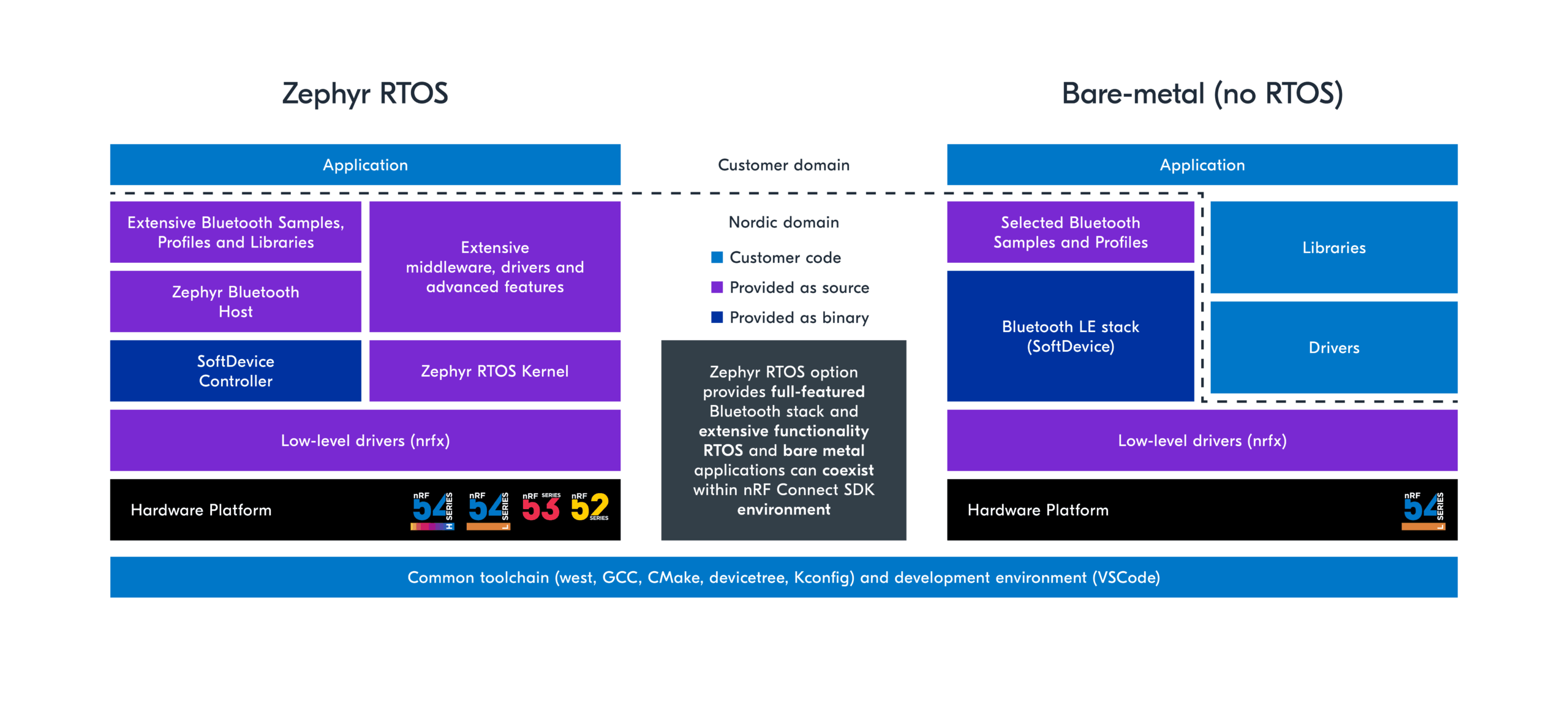
In developing firmware for the nRF54L Series, the nRF Connect SDK offers two distinct approaches:
RTOS-based (Zephyr) firmware development.
Bare Metal firmware development.
With the RTOS-based approach, you gain comprehensive support for the latest Bluetooth LE features along with other protocols like Matter, Thread, Zigbee, NFC, and proprietary 2.4GHz technologies, rich middleware, libraries, and driver support. On the other hand, the Bare Metal option only supports Bluetooth LE, NFC and comes with certain limitations. You should select the development path that best aligns with the specific requirements of your application.
Feature
RTOS-based
Bare Metal
Supported Protocols
Bluetooth LE, Bluetooth Mesh, Thread, Zigbee, Matter, Aliro Google Find Hub, Apple Find My, Amazon Sidewalk, Proprietary 2.4 GHz Protocols, NFC
Bluetooth LE and NFC only
Bluetooth LE Support
Multi-role support (Central & Peripheral) Coded PHY Extended Advertising Periodic Advertising with Responses (PAwR) Channel Sounding Direction Finding LE Audio Shorter Connection Interval (SCI)
Multi-role support (Central & Peripheral) only
Supported hardware
nRF54L Series, as well as all other Nordic SoCs (nRF52, nRF53, nRF91, nRF70)
Only for the nRF54L Series
Extensive middleware and libraries
Yes
Limited to Bluetooth LE (Peripheral&Central) and NFC
Samples available
An extensive set of samples and full-fledged applications
Extensive driver support for components like sensors, etc.. In addition to low-level drivers (nrfx)
Only low-level drivers (nrfx) for the hardware peripherals
Long-term support (LTS)
5 years
No
nRF Connect SDK
The nRF Connect SDK is a scalable and unified software development kit designed for building low-power wireless applications with Nordic Semiconductor’s wireless devices. It offers an extensible framework for building size-optimized software for memory-constrained devices as well as powerful and complex software for more advanced devices and applications.
It integrates the Zephyr Real-Time Operating System (RTOS) and a wide range of complete applications, samples, and protocol stacks, including Bluetooth Low Energy, Bluetooth mesh, Wi-Fi, Matter, Thread/Zigbee, LTE-M/NB-IoT/GPS, TCP/IP. It also includes middleware such as CoAP, MQTT, LwM2M, various libraries, hardware drivers, Trusted Firmware-M for security, machine learning frameworks, and a bootloader (MCUboot).
Zephyr RTOS is an open-source real-time operating system designed for connected, resource-constrained embedded devices. It features a scheduler that guarantees predictable and deterministic execution patterns while abstracting the timing requirements. It also comes with a rich set of fundamental libraries and middleware that simplifies development and helps reduce a product’s time to market. Zephyr RTOS is highly configurable, allowing for scalable configurations that range from minimal setups for memory-constrained devices (as little as 8 kilobytes for simple applications like LED blinking) to powerful, feature-rich setups for high-processing power devices requiring multiple megabytes of memory.
The nRF Connect SDK provides all core components, including the Zephyr RTOS, drivers, libraries (including DFU), bootloader, wireless protocol stacks, and samples needed for evaluation and development on the nRF54L Series. Additionally, the SDK offers two distinct firmware development pathways: RTOS-based and Bare Metal.
1. RTOS-based development
This pathway is the standard, default option that features a comprehensive Bluetooth LE stack, extensive libraries and middleware, and support for multiprotocol wireless connectivity. It is the recommended route for harnessing the full capabilities of the nRF54L Series.
Choosing this path is essential if your product requires access to the latest Bluetooth LE features, such as Periodic Advertising with Responses, Channel Sounding, LE Audio, Direction Finding, Shorter Connection Interval, and others.
It is also the appropriate choice if your project demands support for multiple protocols or integration with ecosystems like Google Find My, Apple Find My, and Amazon Sidewalk.
By following this option, you will leverage the full power of the nRF Connect SDK and Zephyr, gaining access to a rich array of middleware, libraries, and sensor drivers, thus maximizing the potential of your development efforts.
Long-term support (LTS) releases are standard nRF Connect SDK releases with at least five years of support. These releases provide a stable code base for long-term product development. Use an LTS release when you need a predictable foundation for device firmware.
They are based on the following principles:
Stability: Applications and boards based on an LTS release do not require modification when you update to minor LTS releases.
Security: Security issues, including vulnerabilities, are fixed in the LTS release for the entire support period.
2. Bare Metal development (Bluetooth LE only)
The nRF Connect SDK also offers a Bare Metal configuration for the nRF54L Series for simple Bluetooth LE applications that do not benefit from an RTOS or advanced features. This option comes with two options of pre-compiled Bluetooth LE stack (SoftDevice):
S115 – Support for peripheral role only.
S145 – Support for both peripheral and central role, as well as more connections.
Currently supported features:
Peripheral role only (S115), or peripheral and central roles (S145).
Uses the same API as the latest nRF5 SDK SoftDevice (v17), including Timeslot API, Flash API, GATT and GAP APIs
Supports 1M and 2M PHY, ATT and SM, LE Secure connections, GATT client and server, custom UUID, Bluetooth LE RSSI QoS, configurable ATT MTU, long ATT MTU, and configurable attribute table size.
Includes Single-bank Device Firmware Upgrade (DFU)
The Bare Metal option has the following limitations:
It does not support Coded PHY, Extended Advertising, or advanced features such as Channel Sounding, LE Audio, SCI, and Bluetooth Mesh.
This option is ideal for projects requiring a simple Bluetooth LE application without the need for advanced features.
The architecture and APIs for the Bare Metal configuration are very similar to those of the older nRF5 SDK (using SoftDevice S113 and S140), including the use of low-level nrfx drivers directly, which facilitates an easy migration from an existing codebase on the nRF52 Series.
Both Bare Metal and Zephyr RTOS-based development are supported within the same SDK and VS Code development environment. This dual support allows you to choose the configuration that best fits your application needs and provides an easy pathway to upgrade to the full SDK feature set through Zephyr RTOS-based application development later.
Additionally, the Bare Metal option includes a single-bank Device Firmware Update (DFU) solution, optimizing Non-Volatile Memory usage for applications.
How to get started
RTOS-based development
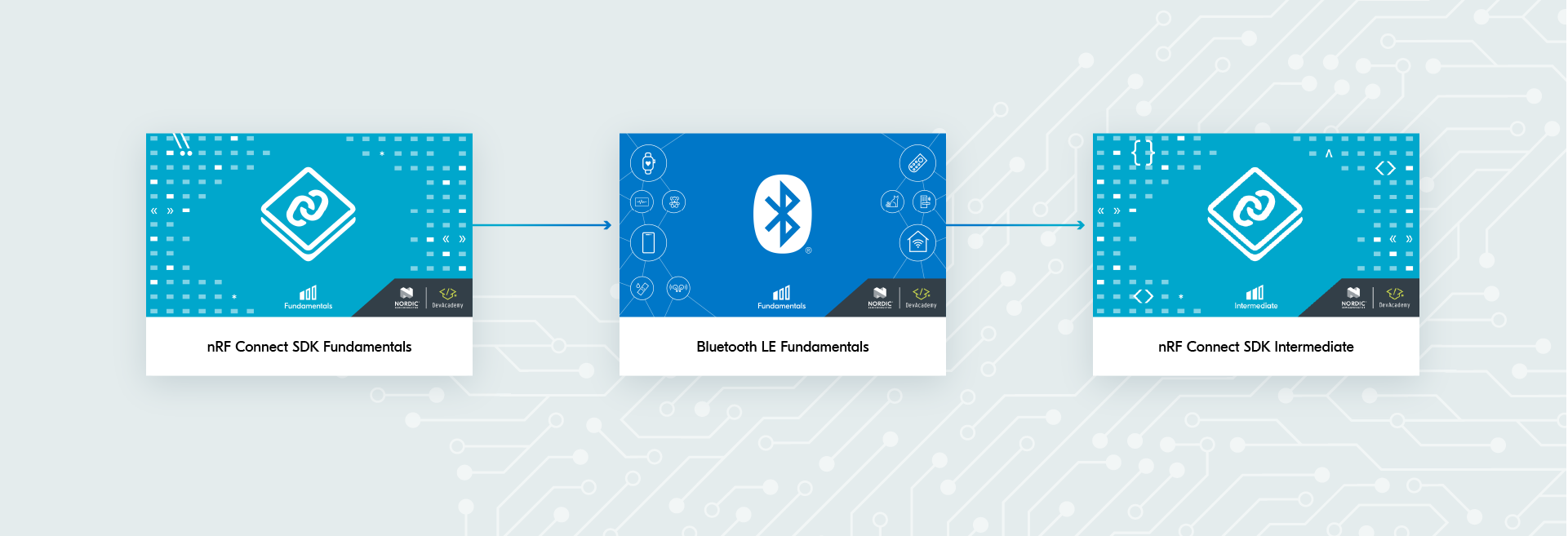
To start development with RTOS-based firmware in nRF Connect SDK, we recommend following the Nordic DevAcademy learning path.
To begin mastering the nRF Connect SDK, start with the nRF Connect SDK Fundamentals course. This introductory course guides you through the installation of the nRF Connect SDK, and the processes of building and flashing an application. You’ll learn how to interact with GPIOs, understand the structure of an application, and work with logging, UART, and I2C. The course also covers essential aspects of the Zephyr RTOS, including multithreaded applications and thread synchronization.
For those focusing on protocol-specific development, we offer the Bluetooth Low Energy Fundamentals course. This is ideal if you’re developing a Bluetooth LE application. If not, you can skip this section.
Once completed, progress to the nRF Connect SDK Intermediate course to delve into more advanced topics. This course enhances your skills in debugging applications and adding support for custom boards. You’ll explore how to interact with PWM, SPI, and ADC peripherals, develop custom drivers, secure Device Firmware Updates over various transports, and deepen your understanding of RTOS-based development, including thread management.
In this Privacy Policy you will find information on Nordic Semiconductor ASA (“Nordic Semiconductor”) processes your personal data when you use the Nordic Developer Academy.
References to “we” and “us” in this document refers to Nordic Semiconductor.
2. Our processing of personal data when you use the Nordic Developer Academy
2.1 Nordic Developer Academy
Nordic Semiconductor processes personal data in order to provide you with the features and functionality of the Nordic Developer Academy. Creating a user account is optional, but required if you want to track you progress and view your completed courses and obtained certificates. If you choose to create a user account, we will process the following categories of personal data:
Email
Name
Password (encrypted)
Course progression (e.g. which course you have completely or partly completed)
Certificate information, which consists of name of completed course and the validity of the certificate
Course results
During your use of the Nordic Developer Academy, you may also be asked if you want to provide feedback. If you choose to respond to any such surveys, we will also process the personal data in your responses in that survey.
The legal basis for this processing is GDPR article 6 (1) b. The processing is necessary for Nordic Semiconductor to provide the Nordic Developer Academy under the Terms of Service.
2.2 Analytics
If you consent to analytics, Nordic Semiconductor will use Google Analytics to obtain statistics about how the Nordic Developer Academy is used. This includes collecting information on for example what pages are viewed, the duration of the visit, the way in which the pages are maneuvered, what links are clicked, technical information about your equipment. The information is used to learn how Nordic Developer Academy is used and how the user experience can be further developed.
2.2 Newsletter
You can consent to receive newsletters from Nordic from within the Nordic Developer Academy. How your personal data is processed when you sign up for our newsletters is described in the Nordic Semiconductor Privacy Policy.
3. Retention period
We will store your personal data for as long you use the Nordic Developer Academy. If our systems register that you have not used your account for 36 months, your account will be deleted.
4. Additional information
Additional information on how we process personal data can be found in the Nordic Semiconductor Privacy Policy and Cookie Policy.
Nordic Developer Academy Terms of Service
1. Introduction
These terms and conditions (“Terms of Use”) apply to the use of the Nordic Developer Academy, provided by Nordic Semiconductor ASA, org. nr. 966 011 726, a public limited liability company registered in Norway (“Nordic Semiconductor”).
Nordic Developer Academy allows the user to take technical courses related to Nordic Semiconductor products, software and services, and obtain a certificate certifying completion of these courses. By completing the registration process for the Nordic Developer Academy, you are agreeing to be bound by these Terms of Use.
These Terms of Use are applicable as long as you have a user account giving you access to Nordic Developer Academy.
2. Access to and use of Nordic Developer Academy
Upon acceptance of these Terms of Use you are granted a non-exclusive right of access to, and use of Nordic Developer Academy, as it is provided to you at any time. Nordic Semiconductor provides Nordic Developer Academy to you free of charge, subject to the provisions of these Terms of Use and the Nordic Developer Academy Privacy Policy.
To access select features of Nordic Developer Academy, you need to create a user account. You are solely responsible for the security associated with your user account, including always keeping your login details safe.
You will able to receive an electronic certificate from Nordic Developer Academy upon completion of courses. By issuing you such a certificate, Nordic Semiconductor certifies that you have completed the applicable course, but does not provide any further warrants or endorsements for any particular skills or professional qualifications.
Nordic Semiconductor will continuously develop Nordic Developer Academy with new features and functionality, but reserves the right to remove or alter any existing functions without notice.
3. Acceptable use
You undertake that you will use Nordic Developer Academy in accordance with applicable law and regulations, and in accordance with these Terms of Use. You must not modify, adapt, or hack Nordic Developer Academy or modify another website so as to falsely imply that it is associated with Nordic Developer Academy, Nordic Semiconductor, or any other Nordic Semiconductor product, software or service.
You agree not to reproduce, duplicate, copy, sell, resell or in any other way exploit any portion of Nordic Developer Academy, use of Nordic Developer Academy, or access to Nordic Developer Academy without the express written permission by Nordic Semiconductor. You must not upload, post, host, or transmit unsolicited email, SMS, or \”spam\” messages.
You are responsible for ensuring that the information you post and the content you share does not;
contain false, misleading or otherwise erroneous information
infringe someone else’s copyrights or other intellectual property rights
contain sensitive personal data or
contain information that might be received as offensive or insulting.
Such information may be removed without prior notice.
Nordic Semiconductor reserves the right to at any time determine whether a use of Nordic Developer Academy is in violation of its requirements for acceptable use.
Violation of the at any time applicable requirements for acceptable use may result in termination of your account. We will take reasonable steps to notify you and state the reason for termination in such cases.
4. Routines for planned maintenance
Certain types of maintenance may imply a stop or reduction in availability of Nordic Developer Academy. Nordic Semiconductor does not warrant any level of service availability but will provide its best effort to limit the impact of any planned maintenance on the availability of Nordic Developer Academy.
5. Intellectual property rights
Nordic Semiconductor retains all rights to all elements of Nordic Developer Academy. This includes, but is not limited to, the concept, design, trademarks, know-how, trade secrets, copyrights and all other intellectual property rights.
Nordic Semiconductor receives all rights to all content uploaded or created in Nordic Developer Academy. You do not receive any license or usage rights to Nordic Developer Academy beyond what is explicitly stated in this Agreement.
6. Liability and damages
Nothing within these Terms of Use is intended to limit your statutory data privacy rights as a data subject, as described in the Nordic Developer Academy Privacy Policy. You acknowledge that errors might occur from time to time and waive any right to claim for compensation as a result of errors in Nordic Developer Academy. When an error occurs, you shall notify Nordic Semiconductor of the error and provide a description of the error situation.
You agree to indemnify Nordic Semiconductor for any loss, including indirect loss, arising out of or in connection with your use of Nordic Developer Academy or violations of these Terms of Use. Nordic Semiconductor shall not be held liable for, and does not warrant that (i) Nordic Developer Academy will meet your specific requirements, (ii) Nordic Developer Academy will be uninterrupted, timely, secure, or error-free, (iii) the results that may be obtained from the use of Nordic Developer Academy will be accurate or reliable, (iv) the quality of any products, services, information, or other material purchased or obtained by you through Nordic Developer Academy will meet your expectations, or that (v) any errors in Nordic Developer Academy will be corrected.
You accept that this is a service provided to you without any payment and hence you accept that Nordic Semiconductor will not be held responsible, or liable, for any breaches of these Terms of Use or any loss connected to your use of Nordic Developer Academy. Unless otherwise follows from mandatory law, Nordic Semiconductor will not accept any such responsibility or liability.
7. Change of terms
Nordic Semiconductor may update and change the Terms of Use from time to time. Nordic Semiconductor will seek to notify you about significant changes before such changes come into force and give you a possibility to evaluate the effects of proposed changes. Continued use of Nordic Developer Academy after any such changes shall constitute your acceptance of such changes. You can review the current version of the Terms of Use at any time at https://academy.nordicsemi.com/terms-of-service/
8. Transfer of rights
Nordic Semiconductor is entitled to transfer its rights and obligation pursuant to these Terms of Use to a third party as part of a merger or acquisition process, or as a result of other organizational changes.
9. Third Party Services
To the extent Nordic Developer Academy facilitates access to services provided by a third party, you agree to comply with the terms governing such third party services. Nordic Semiconductor shall not be held liable for any errors, omissions, inaccuracies, etc. related to such third party services.
10. Dispute resolution
The Terms of Use and any other legally binding agreement between yourself and Nordic Semiconductor shall be subject to Norwegian law and Norwegian courts’ exclusive jurisdiction.
Switch language?
Progress is tracked separately for each language. Switching will continue from your progress in that language or start fresh if you haven't begun.
Your current progress is saved, and you can switch back anytime.